
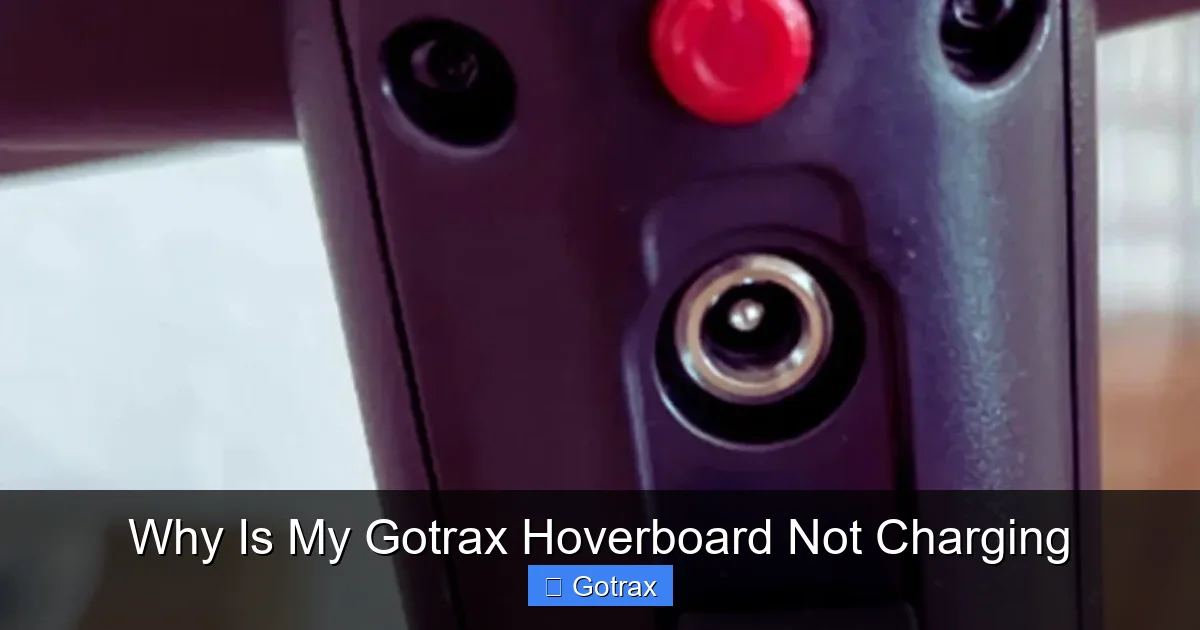
If your Gotrax hoverboard is not charging, it’s often due to a faulty charger, loose connections, or a drained battery. Simple checks like inspecting the power port, testing the outlet, and resetting the board can solve most issues.
Key Takeaways
- Check the charger and cable: A damaged or incompatible charger is the most common reason a Gotrax hoverboard won’t charge. Always use the original charger and inspect for frayed wires or loose plugs.
- Inspect the charging port: Dirt, lint, or physical damage in the charging port can prevent proper connection. Clean it gently with a toothpick or compressed air.
- Test the power outlet: Ensure the outlet is working by plugging in another device. Try a different outlet to rule out electrical issues.
- Reset the hoverboard: A soft reset can fix temporary glitches. Turn off the board, unplug it, wait 10 minutes, then reconnect and try charging again.
- Monitor battery health: Over time, lithium-ion batteries degrade. If your hoverboard won’t hold a charge, the battery may need replacement.
- Avoid overcharging: Leaving your hoverboard plugged in for too long can damage the battery. Charge for 3–4 hours and unplug once fully charged.
- Contact Gotrax support: If troubleshooting fails, reach out to Gotrax customer service or check your warranty for repair or replacement options.
📑 Table of Contents
Why Is My Gotrax Hoverboard Not Charging? A Complete Guide
You’re excited to hop on your Gotrax hoverboard for a quick ride around the neighborhood or to get to class, but when you press the power button—nothing happens. The battery icon is empty, and plugging it in doesn’t seem to help. Frustrating, right? You’re not alone. One of the most common issues Gotrax hoverboard owners face is when their board simply won’t charge. It’s a problem that can leave you stranded, confused, and wondering what went wrong.
But don’t panic. Most charging issues with Gotrax hoverboards are fixable—and often stem from simple, overlooked causes. Whether it’s a faulty charger, a dirty charging port, or a battery that’s seen better days, understanding the root of the problem is the first step to getting back on the road. In this guide, we’ll walk you through the most common reasons your Gotrax hoverboard isn’t charging, how to diagnose the issue, and what you can do to fix it—no technical degree required.
We’ll cover everything from basic troubleshooting steps to advanced tips for maintaining your hoverboard’s battery life. By the end, you’ll know exactly what to check, how to reset your board, and when it’s time to call in the experts. So grab your charger, find a comfy spot, and let’s get your hoverboard powered up and ready to roll.
Common Causes of Charging Problems

Visual guide about Why Is My Gotrax Hoverboard Not Charging
Image source: scooterinsights.com
When your Gotrax hoverboard won’t charge, it’s easy to assume the worst—maybe the battery is dead, or the whole thing is broken. But in reality, most charging issues are caused by a handful of common, often preventable problems. Let’s break them down so you can identify what might be going on with your board.
Faulty or Incompatible Charger
The charger is the lifeline between your hoverboard and a full battery. If it’s damaged, worn out, or not the right model, your hoverboard simply won’t charge—no matter how long you leave it plugged in. Gotrax hoverboards come with a specific charger designed for their battery voltage and amperage. Using a third-party or mismatched charger can lead to undercharging, overheating, or no charging at all.
For example, if your Gotrax GXL V2 uses a 36V charger and you accidentally plug in a 24V one, it won’t deliver enough power to charge the battery. Similarly, a charger with a frayed cord or loose plug might make intermittent contact, causing the charging light to flicker or not turn on at all. Always use the original Gotrax charger that came with your board. If you’ve lost it, make sure to purchase a replacement directly from Gotrax or an authorized retailer.
Damaged or Dirty Charging Port
The charging port on your hoverboard is a small but critical component. Over time, it can collect dust, lint, or even moisture, especially if you ride outdoors or store your board in a garage or closet. This buildup can block the connection between the charger and the port, preventing electricity from flowing.
You might notice that the charger plug doesn’t fit snugly, or the charging light doesn’t come on even when the charger is plugged in. In some cases, the port itself may be physically damaged—bent pins, cracked plastic, or corrosion from water exposure. If you’ve dropped your hoverboard or exposed it to rain, this could be the culprit.
Dead or Drained Battery
Lithium-ion batteries, like the ones in Gotrax hoverboards, have a limited lifespan. After hundreds of charge cycles, they begin to lose their ability to hold a charge. If your hoverboard has been sitting unused for weeks or months, the battery may have completely drained to a point where it can’t accept a charge anymore.
This is especially common if you’ve stored your hoverboard during winter or while traveling. A deeply discharged battery might not show any signs of life—no lights, no response when you press the power button. In some cases, the battery protection circuit kicks in to prevent damage, effectively “locking” the battery until it’s jump-started or reset.
Power Outlet or Electrical Issues
Sometimes, the problem isn’t with the hoverboard at all—it’s with the power source. If the outlet you’re using isn’t working, or if there’s a tripped circuit breaker, your hoverboard won’t charge. This is an easy fix, but it’s often overlooked.
Try plugging another device—like a phone charger or lamp—into the same outlet. If it doesn’t work, the issue is with your home’s electrical system. Check your circuit breaker panel to see if a switch has flipped. Also, avoid using extension cords or power strips, as they can reduce voltage and prevent proper charging.
Internal Wiring or Circuit Board Problems
If everything else checks out—charger, port, outlet—the issue might be internal. The hoverboard’s internal wiring, fuse, or battery management system (BMS) could be faulty. The BMS is a small circuit that protects the battery from overcharging, overheating, or short circuits. If it malfunctions, it can stop the charging process entirely.
This is more common in older hoverboards or those that have been dropped or exposed to extreme temperatures. Unfortunately, internal issues usually require professional repair or replacement parts, which is why it’s important to rule out simpler causes first.
Step-by-Step Troubleshooting Guide
Visual guide about Why Is My Gotrax Hoverboard Not Charging
Image source: scooterinsights.com
Now that you know the most common causes, let’s walk through a practical troubleshooting process. Follow these steps in order—they’re designed to help you identify and fix the problem without unnecessary hassle.
Step 1: Check the Charger and Cable
Start by inspecting your charger. Look for any visible damage—cracked casing, frayed wires, or bent prongs. Plug the charger into a working outlet and see if the LED light turns on. Most Gotrax chargers have a red or green light that indicates power. If the light doesn’t come on, the charger is likely faulty.
Next, check the connection between the charger and the hoverboard. Make sure the plug fits securely into the charging port. Wiggle it gently—if the light flickers or turns off, there may be a loose connection. Try using the charger with another Gotrax hoverboard (if available) to confirm whether the issue is with the charger or the board.
Step 2: Inspect the Charging Port
Turn off your hoverboard and unplug it. Use a flashlight to look inside the charging port. You’re checking for dirt, lint, or debris. If you see buildup, gently clean it out with a dry toothpick or a can of compressed air. Avoid using water or metal tools, as they can cause short circuits or damage the port.
If the port looks physically damaged—bent pins, cracks, or corrosion—stop here. Continuing to charge a damaged port can be dangerous and may void your warranty. Contact Gotrax support for repair options.
Step 3: Test the Power Outlet
Plug a different device into the same outlet you’ve been using. A phone charger, lamp, or fan works well. If the device doesn’t turn on, the outlet isn’t supplying power. Try a different outlet in another room. If that works, your original outlet may need to be repaired by an electrician.
Also, avoid using power strips or surge protectors. These can interfere with the charging process, especially if they’re old or low-quality. Plug the charger directly into the wall.
Step 4: Perform a Soft Reset
Sometimes, the hoverboard’s internal system just needs a reboot. Here’s how to do a soft reset:
1. Turn off the hoverboard completely.
2. Unplug the charger.
3. Leave the board unplugged for at least 10 minutes. This allows the internal circuits to fully discharge.
4. After 10 minutes, plug the charger back in and turn on the hoverboard.
Wait a few minutes to see if the charging light comes on. If it does, the reset worked. If not, move to the next step.
Step 5: Check the Battery Indicator
Once the hoverboard is on, check the battery indicator on the display. If it shows zero or flashes red, the battery is critically low. Let it charge for at least 3–4 hours—even if the light doesn’t come on right away. Sometimes, a deeply drained battery takes time to “wake up.”
If after several hours the battery still doesn’t charge, the battery itself may be faulty. This is more common in hoverboards over 1–2 years old or those that have been frequently overcharged or stored in extreme temperatures.
Step 6: Try a Different Charger (If Available)
If you have access to another Gotrax-compatible charger, try using it. This will help determine whether the issue is with your original charger or the hoverboard itself. Only use chargers that match your model’s voltage and amperage—using the wrong one can damage the battery.
How to Maintain Your Gotrax Hoverboard’s Battery
Prevention is always better than repair. By taking good care of your hoverboard’s battery, you can avoid many charging problems before they start. Here are some best practices to keep your Gotrax running smoothly for years.
Charge Regularly—But Don’t Overcharge
Lithium-ion batteries perform best when they’re kept between 20% and 80% charge. Avoid letting your hoverboard die completely before recharging. If you’re not using it for a few days, charge it to about 50% and store it in a cool, dry place.
Overcharging is just as harmful. Never leave your hoverboard plugged in overnight or for more than 4–6 hours. Most Gotrax models have built-in protection to stop charging when full, but it’s still safer to unplug once the light turns green.
Store Properly
If you’re not using your hoverboard for an extended period—like during winter or while traveling—don’t store it with a dead battery. A fully discharged battery can degrade quickly and may not recharge later. Instead, charge it to about 50–60%, then turn it off and store it in a temperature-controlled environment (ideally between 50°F and 77°F).
Avoid storing your hoverboard in hot cars, garages, or near windows. Extreme heat or cold can damage the battery and reduce its lifespan.
Keep It Clean
Dirt, dust, and moisture are enemies of your hoverboard’s electronics. After riding, wipe down the deck and wheels with a dry cloth. Use a soft brush to clean around the charging port and sensors. Never spray water directly on the board—use a damp cloth if needed, and make sure it’s completely dry before charging.
Inspect Regularly
Make it a habit to check your hoverboard before and after each ride. Look for loose screws, cracks in the shell, or signs of wear on the tires. Pay special attention to the charging port and charger cable. Catching small issues early can prevent bigger problems down the road.
Update Firmware (If Applicable)
Some newer Gotrax models come with Bluetooth connectivity and app support. These apps may offer firmware updates that improve battery performance and charging efficiency. Check the Gotrax app regularly for updates and install them as recommended.
When to Replace the Battery or Contact Support
Even with the best care, batteries don’t last forever. If you’ve tried all the troubleshooting steps and your hoverboard still won’t charge, it may be time to consider a battery replacement or professional help.
Signs You Need a New Battery
– The hoverboard won’t turn on, even after charging for hours.
– The battery drains extremely quickly—lasting only a few minutes per charge.
– The charging light flickers or turns off after a few seconds.
– The board shuts down unexpectedly during use.
If you notice any of these signs, the battery may be nearing the end of its life. Gotrax offers replacement batteries for most models, but installation can be tricky. Unless you’re comfortable with electronics, it’s best to have it done by a professional.
Warranty and Support
Gotrax hoverboards typically come with a 90-day to 1-year limited warranty, depending on the model. If your hoverboard is still under warranty and won’t charge due to a manufacturing defect, you may be eligible for a free repair or replacement.
To file a claim, visit the Gotrax support website and provide your order number, model, and a description of the issue. You may need to upload photos or videos of the problem. Gotrax customer service is generally responsive and helpful, so don’t hesitate to reach out.
Third-Party Repair Options
If your warranty has expired, you can still get your hoverboard repaired. Look for local electronics repair shops that specialize in hoverboards or electric scooters. Some online services also offer mail-in repairs. Just be cautious—using unauthorized repair services may void any remaining warranty.
Final Thoughts: Getting Back on Your Gotrax
Finding out your Gotrax hoverboard isn’t charging can be a real bummer—especially when you’re ready to ride. But as we’ve seen, most charging issues are fixable with a little patience and the right approach. Start with the basics: check your charger, clean the port, test the outlet, and reset the board. These simple steps solve the majority of problems.
Remember, your hoverboard is a precision device with a delicate battery system. Treat it with care, charge it properly, and store it wisely. By following the maintenance tips in this guide, you’ll extend the life of your board and avoid future charging headaches.
And if all else fails? Don’t suffer in silence. Gotrax offers solid customer support, and replacement parts are available for most models. Whether it’s a new battery, a fresh charger, or a full repair, there’s usually a solution.
So the next time your Gotrax hoverboard won’t charge, don’t panic. Grab this guide, work through the steps, and get back to gliding down the sidewalk with confidence. Your hoverboard—and your sense of adventure—will thank you.
Frequently Asked Questions
Why won’t my Gotrax hoverboard charge even though the charger light is on?
The charger light may be on, but that doesn’t always mean power is reaching the battery. The issue could be a loose connection, dirty charging port, or a faulty battery. Try cleaning the port, checking the cable, and performing a soft reset.
How long should I charge my Gotrax hoverboard?
Most Gotrax hoverboards take 3–4 hours to fully charge. Avoid charging for more than 6 hours, as overcharging can damage the battery. Unplug once the charging light turns green.
Can I use a different charger for my Gotrax hoverboard?
Only use the original Gotrax charger or a compatible replacement with the same voltage and amperage. Using the wrong charger can damage the battery or cause safety hazards.
What should I do if my hoverboard won’t turn on after charging?
First, ensure it’s fully charged. If it still won’t turn on, try a soft reset. If that doesn’t work, the battery may be dead or the internal circuitry damaged—contact Gotrax support.
How can I tell if my hoverboard battery is bad?
Signs include rapid draining, failure to charge, or the board shutting off during use. If troubleshooting doesn’t help, the battery may need replacement.
Is it safe to leave my Gotrax hoverboard charging overnight?
It’s not recommended. While most models have overcharge protection, leaving it plugged in for too long can reduce battery lifespan. Charge for 3–4 hours and unplug when done.