

Charging your Gotrax hoverboard correctly ensures long battery life, optimal performance, and safety. This guide walks you through every step—from identifying the right charger to troubleshooting common issues—so you can keep your hoverboard ready for your next ride.
Key Takeaways
- Use only the official Gotrax charger: Third-party chargers can damage the battery or cause safety hazards.
- Charge in a cool, dry place: Avoid extreme temperatures to protect battery health and prevent overheating.
- Don’t overcharge: Unplug once the light turns green to extend battery lifespan.
- Check the charging port regularly: Clean dust and debris to ensure a solid connection.
- Store with a partial charge: Keep the battery between 40% and 60% if not using the hoverboard for weeks.
- Follow the 2-hour rule: Most Gotrax models take about 2 hours to fully charge from empty.
- Monitor the LED indicator: Red means charging, green means fully charged—don’t ignore these signals.
How to Charge Gotrax Hoverboard: A Complete Step-by-Step Guide
So you’ve just unboxed your brand-new Gotrax hoverboard—or maybe you’ve been riding it for months and suddenly noticed it’s not holding a charge like it used to. Either way, knowing how to charge your Gotrax hoverboard properly is essential for safety, performance, and longevity. Whether you’re a first-time rider or a seasoned hoverboard enthusiast, this guide will walk you through everything you need to know—from the basics of charging to advanced tips for maintaining your battery.
In this comprehensive how-to guide, you’ll learn:
– How to identify the correct charger for your Gotrax model
– The exact steps to safely charge your hoverboard
– How long it takes to charge and when to unplug
– Tips for maintaining battery health over time
– Troubleshooting common charging problems
– Safety precautions to avoid accidents
Let’s dive in and make sure your Gotrax hoverboard is always ready to roll.
Why Proper Charging Matters
Before we get into the “how,” let’s talk about the “why.” Charging your Gotrax hoverboard isn’t just about plugging it in and walking away. It’s a critical part of owning and maintaining your device. A poorly charged hoverboard can lead to:
– Reduced battery life
– Overheating or fire risk
– Inconsistent performance
– Unexpected shutdowns mid-ride
Gotrax hoverboards use lithium-ion batteries, which are powerful and lightweight—but they’re also sensitive. They require specific charging conditions to function safely and efficiently. That’s why following the right charging routine isn’t just recommended—it’s necessary.
Think of your hoverboard’s battery like a smartphone battery. You wouldn’t charge your phone with a random USB cable you found in a drawer, would you? The same logic applies here. Using the wrong charger or charging in extreme conditions can degrade the battery over time, leading to shorter rides and costly replacements.
What You’ll Need to Charge Your Gotrax Hoverboard
Before you begin, make sure you have the following items ready:
The Official Gotrax Charger
This is the most important item. Gotrax hoverboards come with a proprietary charger designed specifically for their battery systems. It usually has a black or gray casing with a Gotrax logo and outputs around 29.4V and 2A. Never substitute this with a generic or third-party charger—even if it fits. Using the wrong charger can void your warranty and pose serious safety risks.
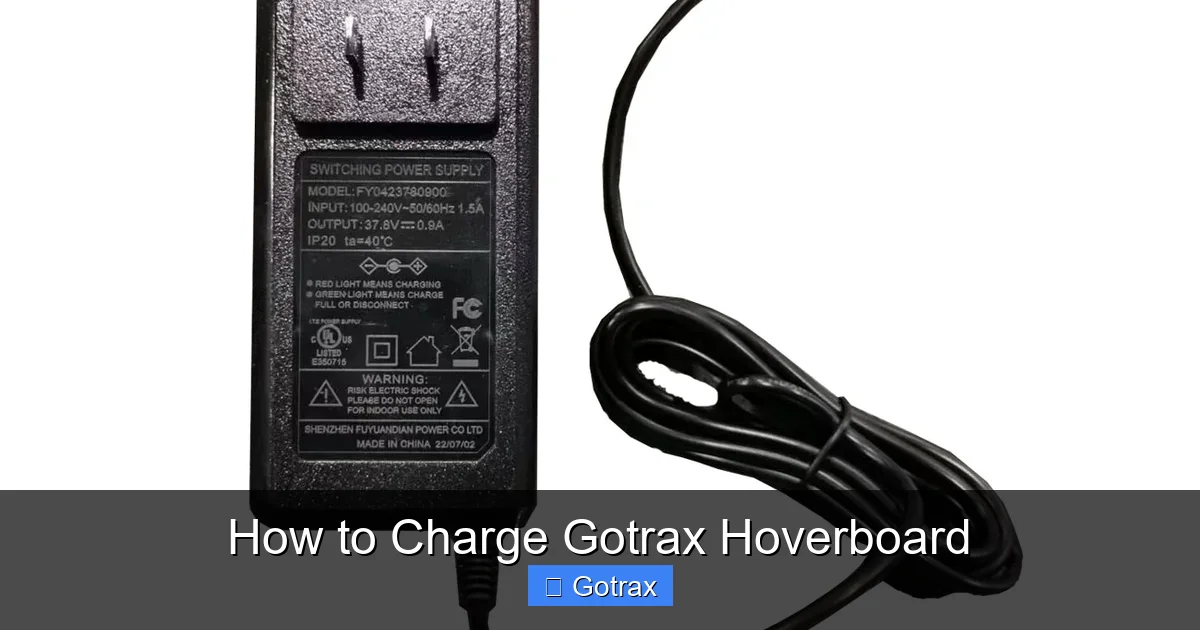
Visual guide about How to Charge Gotrax Hoverboard
Image source: gotrax.com
A Stable Power Source
Plug your charger into a standard wall outlet (110–120V in the U.S.). Avoid power strips, extension cords, or outlets that feel loose or warm. A stable connection ensures consistent charging and reduces the risk of electrical issues.
A Clean, Dry Charging Area
Choose a flat, dry surface away from water, heat sources, or direct sunlight. Avoid charging on carpets, near curtains, or in humid environments like bathrooms. A cool, well-ventilated space is ideal.
Your Gotrax Hoverboard
Make sure your hoverboard is powered off before charging. While some models allow charging while on, it’s safer and more efficient to turn it off. Also, check that the charging port is clean and free of dust or debris.
Step-by-Step Guide: How to Charge Your Gotrax Hoverboard
Now that you’re prepared, let’s go through the charging process step by step.
Step 1: Turn Off the Hoverboard
Press and hold the power button until the LED lights turn off. This ensures the board isn’t drawing power while charging, which can slow down the process and stress the battery.
Step 2: Locate the Charging Port
The charging port is usually on the side or rear of the hoverboard, protected by a small rubber flap. Gently lift the flap to reveal the port. It’s typically a round, barrel-style connector.
Step 3: Inspect the Port and Cable
Before plugging in, take a moment to inspect both the charging port and the charger’s connector. Look for:
– Dirt, dust, or lint in the port
– Bent or damaged pins
– Frayed wires on the charger cable
If you see any damage, do not charge. Contact Gotrax support for assistance.
Step 4: Plug in the Charger
Insert the charger’s connector into the hoverboard’s charging port. It should fit snugly—don’t force it. Then, plug the other end into the wall outlet. You should see a small LED light on the charger turn on.
Step 5: Monitor the Charging Light
Most Gotrax chargers have an LED indicator:
– Red light: The hoverboard is charging.
– Green light: The battery is fully charged.
Keep an eye on this light. It usually takes about 2 hours to go from empty to full, depending on the model.
Step 6: Wait Patiently
Avoid unplugging the charger too soon. Even if the light turns green quickly, give it an extra 10–15 minutes to ensure a complete charge. Rushing can lead to incomplete charging, which affects performance.
Step 7: Unplug and Store Safely
Once the light is green, unplug the charger from the wall first, then disconnect it from the hoverboard. Close the rubber flap to protect the port. Store the charger in a dry place, preferably in its original packaging or a protective case.
How Long Does It Take to Charge a Gotrax Hoverboard?
One of the most common questions is: “How long does it take to charge a Gotrax hoverboard?” The answer depends on the model and battery capacity, but here’s a general breakdown:
– Gotrax GXL V2: ~2 hours
– Gotrax G4: ~2.5 hours
– Gotrax GMAX: ~3 hours
– Gotrax XR: ~2 hours
These times assume the battery is completely drained. If your hoverboard still has some charge, it will take less time. For example, if it’s at 50%, expect about 1 hour to reach full.
Keep in mind that charging time can vary slightly based on:
– Ambient temperature (cold slows charging)
– Charger condition
– Battery age (older batteries charge slower)
Charging Tips for Maximum Battery Life
Charging your Gotrax hoverboard correctly isn’t just about getting it powered up—it’s about preserving the battery for years of use. Here are some expert tips to maximize battery health:
Avoid Full Discharges
Don’t wait until your hoverboard dies completely before charging. Lithium-ion batteries prefer partial discharges. Try to recharge when the battery drops to 20–30%. This reduces stress and extends lifespan.
Don’t Leave It Plugged In Overnight
While modern chargers have overcharge protection, it’s still best practice to unplug once the light turns green. Leaving it plugged in for hours after full charge can generate excess heat and degrade the battery over time.
Charge in Moderate Temperatures
Avoid charging in extreme heat (above 95°F) or cold (below 32°F). Ideal charging temperature is between 50°F and 86°F. Charging in a hot car or freezing garage can damage the battery.
Store with a Partial Charge
If you’re not using your hoverboard for a week or more, charge it to about 50% before storing. Storing at 100% or 0% can cause battery degradation. Check it every few weeks and top it off if needed.
Use the Original Charger Only
We can’t stress this enough: always use the Gotrax-branded charger. Third-party chargers may not regulate voltage properly, leading to overcharging, undercharging, or even fire hazards.
Clean the Charging Port Regularly
Dust and dirt can build up in the charging port, causing poor connections. Use a dry toothbrush or compressed air to gently clean it every few weeks. Never use water or liquids.
Troubleshooting Common Charging Problems
Even with proper care, you might run into charging issues. Here’s how to diagnose and fix the most common problems.
The Charger Light Won’t Turn On
If the LED on your charger doesn’t light up when plugged in, check:
– Is the outlet working? Try another device.
– Is the charger plugged in securely?
– Is the charger damaged? Look for frayed wires or burnt smells.
If everything looks fine but the light still won’t turn on, the charger may be faulty. Contact Gotrax for a replacement.
The Hoverboard Won’t Charge
If the charger light turns on but the hoverboard doesn’t respond:
– Make sure the board is turned off.
– Check the charging port for debris.
– Try a different outlet.
– Ensure the battery isn’t completely dead (some boards won’t charge if voltage is too low).
If none of these work, the battery or internal circuitry may need professional repair.
The Light Turns Green Too Fast
If the charger light turns green in just 10–15 minutes, it could mean:
– The battery was already partially charged.
– The battery is aging and can’t hold a full charge.
– The charger is malfunctioning.
Test by riding the board—if it dies quickly, the battery may need replacement.
The Hoverboard Gets Hot While Charging
Some warmth is normal, but if it’s too hot to touch, unplug immediately. Overheating can indicate:
– A faulty charger
– A damaged battery
– Charging in a hot environment
Let it cool down, then try charging in a cooler location with the original charger.
The Charging Port Feels Loose
If the charger plug wobbles or falls out easily, the port may be damaged. This can cause intermittent charging or sparks. Stop using it and contact Gotrax support. Do not attempt to repair it yourself.
Safety Precautions When Charging
Safety should always come first when charging any electronic device. Here are essential safety tips for charging your Gotrax hoverboard:
Never Charge Unattended
Avoid leaving your hoverboard charging overnight or while you’re away from home. While rare, battery fires can happen. Stay nearby during the first charge and check periodically.
Keep Away from Flammable Materials
Don’t charge near curtains, paper, gasoline, or other flammable items. Even a small spark could ignite a fire.
Don’t Cover the Hoverboard
Never place blankets, clothes, or boxes over the hoverboard while charging. It needs airflow to prevent overheating.
Use Only on Hard, Flat Surfaces
Charge on a table, floor, or countertop—never on a bed or couch. Soft surfaces can trap heat and increase fire risk.
Inspect Before Each Charge
Make it a habit to check the charger, cable, and hoverboard before every charge. Look for cracks, burns, or unusual smells. If something seems off, stop and investigate.
How to Maintain Your Gotrax Hoverboard Battery
Charging is just one part of battery care. To keep your hoverboard running smoothly, follow these maintenance tips:
Charge Regularly
Even if you’re not riding often, charge your hoverboard every 2–3 weeks. Lithium-ion batteries self-discharge over time, and deep discharges can damage them.
Avoid Extreme Rides
Frequent high-speed rides, steep hills, or rough terrain drain the battery faster and generate heat. Mix in easier rides to reduce wear.
Keep It Clean
Wipe down the hoverboard after each use with a dry cloth. Dirt and moisture can seep into ports and damage internal components.
Update Firmware (If Available)
Some Gotrax models support firmware updates via the Gotrax app. These updates can improve battery management and performance. Check the app regularly.
Store Properly
When not in use, store your hoverboard in a cool, dry place away from direct sunlight. Avoid garages or sheds that get extremely hot or cold.
Conclusion: Charge Smart, Ride Safe
Knowing how to charge your Gotrax hoverboard properly is one of the most important things you can do as an owner. It’s not just about convenience—it’s about safety, performance, and getting the most out of your investment.
By following this guide, you’ll ensure your hoverboard charges efficiently, lasts longer, and stays safe to ride. Remember to use the original charger, charge in a cool, dry place, monitor the LED light, and avoid overcharging. And if you ever run into issues, don’t hesitate to reach out to Gotrax customer support.
With the right habits, your Gotrax hoverboard will be ready for every adventure—whether it’s a quick trip to the store or a weekend joyride through the park. Charge smart, ride safe, and enjoy the ride!