
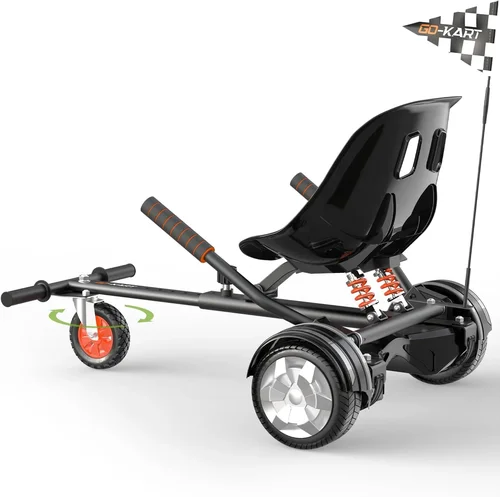
Hoverboards have evolved from futuristic novelties into practical, fun, and surprisingly reliable personal mobility devices—especially for beginners looking to dip their toes into electric transportation. Whether you’re a parent shopping for your first-time rider teen, a college student navigating campus, or an adult curious about eco-friendly short-distance travel, choosing the right beginner hoverboard can make all the difference between a thrilling new hobby and a frustrating, unsafe experience. With hundreds of models flooding the market—from ultra-cheap knockoffs to premium smart-balancing scooters—it’s easy to feel overwhelmed. That’s exactly why this comprehensive buying guide exists: to cut through the noise, clarify the jargon, and help you make a confident, informed decision in 2026.
In this expert-level guide, you’ll learn everything you need to know before buying your first hoverboard. We’ll walk you through the most critical factors to consider—from safety certifications and battery life to weight limits and app connectivity—so you don’t end up with a device that’s too powerful, too fragile, or simply not built for beginners. You’ll also discover the different types of hoverboards available today, common pitfalls to avoid (like skipping UL certification), and how to stretch your budget without sacrificing quality. By the end, you’ll have a clear roadmap tailored to your needs, whether you’re prioritizing affordability, durability, or ease of use. The hoverboard market has matured significantly over the past decade, and while that means more choices, it also demands smarter shopping. Let’s get you equipped with the knowledge to pick the perfect beginner-friendly model.

What to Look for When Buying a Beginner Hoverboard
1. Safety Certifications & UL Compliance
When it comes to hoverboards, safety isn’t just a feature—it’s non-negotiable. The biggest red flag for any beginner should be the absence of proper safety certifications. In 2016, after numerous reports of hoverboards catching fire due to faulty lithium-ion batteries, the U.S. Consumer Product Safety Commission (CPSC) mandated that all self-balancing scooters must meet strict electrical and fire safety standards. The gold standard? UL 2272 certification.
This certification ensures that the hoverboard’s electrical system—including the battery, charger, and wiring—has undergone rigorous testing for overheating, short-circuiting, and fire resistance. Always look for the official UL logo on the product listing or packaging. Avoid sellers who claim “equivalent safety” or “tested internally”—these are often red flags for counterfeit or uncertified units. A UL-certified hoverboard might cost slightly more, but it’s a small price to pay for peace of mind, especially if you’re buying for a younger rider.
2. Battery Life & Range
Battery performance directly impacts how useful your hoverboard will be in real-world scenarios. For beginners, a hoverboard with a range of at least 10–12 miles on a single charge is ideal. This allows for casual rides around the neighborhood, short commutes, or weekend adventures without constant recharging. Most entry-level models use lithium-ion batteries with capacities between 4.4Ah and 6.0Ah. While higher Ah ratings generally mean longer range, they also add weight and cost.
Pay attention to the advertised range, but take it with a grain of salt. Manufacturers often test under perfect conditions—flat terrain, light riders, no wind. In reality, hills, heavier weights, and frequent starts/stops can reduce range by 20–30%. Look for hoverboards with smart battery management systems (BMS) that prevent overcharging, over-discharging, and overheating. Also, check charging time: most beginner models take 2–4 hours to fully recharge. If a hoverboard claims an 8-mile range but takes 6 hours to charge, it may not be practical for daily use.
3. Motor Power & Speed
Motor power determines how smoothly your hoverboard handles different terrains and rider weights. For beginners, a dual-motor system with 250W to 350W per wheel (500W–700W total) is sufficient. This provides enough torque for gentle inclines and responsive acceleration without being overly aggressive. Avoid models with motors below 250W per wheel—they struggle with hills and may shut down under load, which can cause dangerous falls.
Top speed is another consideration. Most beginner hoverboards cap out at 6–8 mph, which is ideal for new riders learning balance and control. Higher speeds (10+ mph) are tempting but increase the risk of accidents, especially on uneven surfaces. Some models offer speed-limiting modes or beginner settings that restrict top speed until the rider gains confidence. These features are invaluable for first-timers and younger users.
Real-World Example:
Imagine a 14-year-old riding a 600W hoverboard on a slight hill. A 500W model might slow down or stall, causing the rider to lose balance. A 700W model with good torque will maintain steady speed, making the ride safer and more enjoyable.
4. Weight Capacity & Rider Suitability
Every hoverboard has a maximum weight limit, typically ranging from 165 lbs to 265 lbs. Exceeding this limit can damage the motors, reduce battery life, and compromise safety. For beginners—especially teens or smaller adults—a hoverboard rated for at least 220 lbs offers room to grow and ensures stable performance.
Also consider the minimum rider weight. Some ultra-light models aren’t responsive for riders under 40–50 lbs, making them unsuitable for younger children. Conversely, heavy-duty models may feel sluggish for lightweight users. Always match the hoverboard’s specs to the intended rider’s weight and skill level.
5. Build Quality & Durability
A beginner hoverboard should be built to withstand bumps, drops, and daily wear. Look for a sturdy frame made from high-grade ABS plastic or reinforced polymer. The foot pads should have non-slip rubber surfaces to prevent slipping, especially in wet conditions. Check the wheel material: pneumatic (air-filled) tires offer better shock absorption on rough terrain, while solid rubber tires are puncture-proof but provide a bumpier ride.
Water resistance is another key factor. While no hoverboard is fully waterproof, many beginner models come with an IP54 rating, meaning they can handle light splashes and dust. Avoid riding in rain or puddles unless the model explicitly states a higher IP rating (like IP65). Also, inspect the build for loose parts, wobbly wheels, or flimsy charging ports—these are signs of poor manufacturing.
6. Features & Functionality
Modern hoverboards come packed with features that enhance usability and fun. For beginners, prioritize practical add-ons like:
- LED headlights and taillights – Essential for visibility during evening rides.
- Bluetooth speakers – Allow music playback via smartphone pairing (great for teens).
- Mobile app integration – Lets you monitor battery life, adjust speed modes, and track ride history.
- Self-balancing technology – Helps new riders stabilize quickly during startup.
- Anti-theft alarms – Some models emit a loud beep if moved while powered off.
While these features are nice-to-haves, don’t let them overshadow core performance and safety. A hoverboard with flashy lights but weak motors or poor battery life will disappoint quickly.
7. Brand Reputation & Customer Support
Not all hoverboard brands are created equal. Established names like Gotrax, Segway, Razor, and Swagtron have built reputations for reliability, customer service, and post-purchase support. These companies often provide detailed user manuals, responsive客服, and accessible replacement parts.
Avoid unknown brands sold exclusively through third-party marketplaces with no verified reviews or contact information. If something goes wrong—like a dead battery or faulty sensor—you’ll want a brand that honors warranties and offers troubleshooting help. Check third-party review sites like Trustpilot or the Better Business Bureau (BBB) for real customer experiences.
8. Warranty & Return Policy
A solid warranty is a strong indicator of a manufacturer’s confidence in their product. For beginner hoverboards, look for at least a 6-month to 1-year limited warranty covering defects in materials and workmanship. Some premium brands offer 18–24 months. Pay attention to what’s excluded: batteries often have shorter coverage (3–6 months), and physical damage is usually not covered.
Equally important is the return policy. Reputable retailers (like Amazon, Best Buy, or the brand’s official website) typically offer 30-day return windows. This gives you time to test the hoverboard and ensure it meets your expectations. Avoid sellers with “final sale” policies or restocking fees—these make it hard to return a defective unit.
Different Types of Beginner Hoverboards

Common Buying Mistakes to Avoid
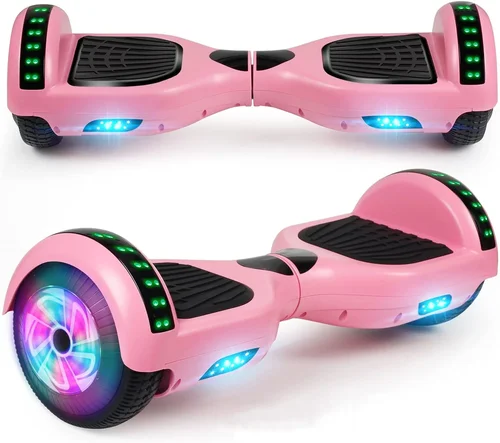
❌ Mistake: Ignoring UL 2272 Certification
Why it’s bad: Buying a hoverboard without UL certification risks fire, explosion, or electrical failure. These devices often use cheap, uncertified batteries that can overheat during charging or use.
What to do instead: Always verify UL 2272 compliance before purchasing. Look for the official UL mark and cross-check the model number on the UL website.
❌ Mistake: Choosing Based Solely on Price
Why it’s bad: The cheapest hoverboards often cut corners on safety, battery quality, and build materials. You may end up replacing it within months—costing more in the long run.
What to do instead: Set a realistic budget ($180–$300 for beginners) and prioritize value over the lowest price. A slightly more expensive model with better reviews and warranty is a smarter investment.
❌ Mistake: Overlooking Weight Limits
Why it’s bad: Riding a hoverboard beyond its weight capacity can cause motor burnout, reduced range, and loss of control—especially on hills.
What to do instead: Check the rider’s weight against the hoverboard’s max capacity. Add 20–30 lbs as a buffer for safety and performance.
❌ Mistake: Skipping the Test Ride
Why it’s bad: Hoverboards feel different in person. A model that looks great online might be too sensitive, slow, or uncomfortable to ride.
What to do instead: If buying in-store, ask to test it. If online, choose retailers with generous return policies so you can return it if it doesn’t feel right.
❌ Mistake: Ignoring Terrain Compatibility
Why it’s bad: A standard hoverboard with solid tires will struggle on grass, gravel, or uneven pavement, leading to a bumpy, unsafe ride.
What to do instead: Match the tire type to your typical riding surface. Choose pneumatic tires for off-road use and solid tires for smooth city paths.
❌ Mistake: Not Checking Return & Warranty Policies
Why it’s bad: Defective units are common, especially with budget models. Without a good return window or warranty, you’re stuck with a broken hoverboard.
What to do instead: Only buy from retailers or brands that offer at least a 30-day return policy and a 6-month warranty.
❌ Mistake: Assuming All Bluetooth Features Work Seamlessly
Why it’s bad: Some hoverboards advertise Bluetooth speakers or app control, but the connection is buggy, the app is outdated, or audio quality is poor.
What to do instead: Read user reviews specifically about app performance and Bluetooth reliability. Look for brands with regularly updated apps.
Budget Guidelines: How Much Should You Spend?
Hoverboard pricing varies widely, but for beginners, here’s a realistic breakdown of what to expect at different budget levels:
Entry-Level ($150–$200): These models are ideal for first-time riders, younger users, or occasional fun. Expect basic features: 500W–600W motors, 6–8 mile range, solid rubber tires, and minimal extras. Safety should still be a priority—look for UL certification even in this range. Brands like Gotrax and Swagtron offer reliable options here.
Mid-Range ($200–$300): This is the sweet spot for most beginners. You’ll get better build quality, longer battery life (10–12 miles), app connectivity, LED lights, and sometimes pneumatic tires. These hoverboards balance performance, safety, and value. Models like the Gotrax GXL V2 or Segway Ninebot S are excellent examples.
Premium ($300–$400): Aimed at serious riders or those who want longevity, these hoverboards feature high-capacity batteries, advanced BMS, all-terrain capabilities, and robust frames. They often support heavier riders and offer firmware updates. Ideal for adults or teens who plan to use the hoverboard daily.
Luxury ($400+): These are top-tier models with cutting-edge tech: GPS tracking, customizable LED patterns, premium sound systems, and ultra-durable materials. While overkill for most beginners, they’re worth considering if you want a device that grows with your skills.
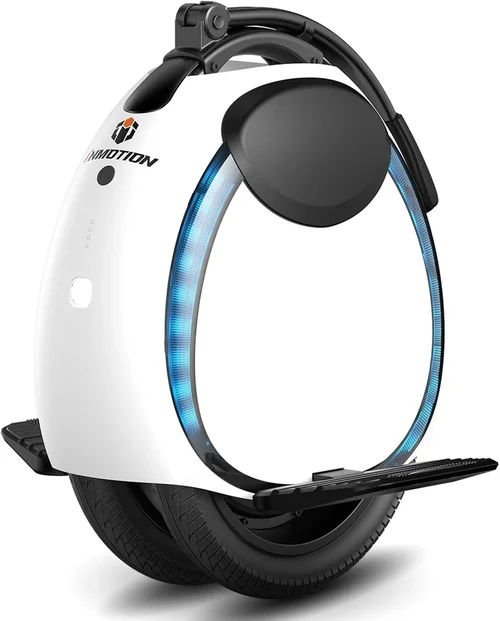
Expert Tips for Getting the Best Deal
- Shop During Sales Seasons: Black Friday, Cyber Monday, and back-to-school periods (July–August) offer the biggest discounts. Many brands run 20–30% off promotions.
- Buy Direct from the Brand: Gotrax, Segway, and Swagtron often have exclusive deals on their official websites, including free shipping and extended warranties.
- Check Amazon Warehouse: You can find open-box or lightly used hoverboards at 20–40% off. Ensure they’re UL-certified and include original accessories.
- Read Recent Reviews: Hoverboard technology evolves quickly. A model praised in 2023 might have been discontinued or updated. Focus on reviews from the last 6–12 months.
- Bundle Accessories: Some retailers offer starter kits with helmets, knee pads, or carrying bags. These can save money compared to buying separately.
- Use Price Tracking Tools: Apps like Honey or CamelCamelCamel alert you when prices drop on Amazon or other sites.
- Verify Seller Authenticity: On marketplaces like eBay or Amazon, check the seller’s rating, return policy, and whether they’re an “Authorized Retailer.”
- Test Before Committing: If possible, visit a local electronics store to try different models. Feeling the balance, speed, and responsiveness firsthand is invaluable.

Frequently Asked Questions
Q: Are hoverboards safe for kids?
A: Yes, but only if they’re UL 2272 certified, age-appropriate, and used with proper safety gear (helmet, knee pads). Most experts recommend hoverboards for kids 8 and older, depending on maturity and coordination.
Q: How long does a hoverboard battery last?
A: Most lithium-ion hoverboard batteries last 2–4 years with regular use, depending on charging habits and maintenance. Avoid draining the battery completely or leaving it plugged in overnight.
Q: Can I ride a hoverboard in the rain?
A: Only if it has an IP65 or higher rating. Most beginner models are IP54, meaning they resist light splashes but shouldn’t be ridden in rain or puddles.
Q: Do I need to wear a helmet?
A: Absolutely. While not legally required in all areas, helmets reduce the risk of head injury by up to 85%. Always wear one, especially for beginners.
Q: How do I learn to ride a hoverboard?
A: Start on a flat, open surface. Hold onto a wall or railing for support. Lean slightly forward to go, backward to stop. Practice balancing before moving. Most people get the hang of it in 10–15 minutes.
Q: Can hoverboards go uphill?
A: Yes, but steep hills (over 10–15% grade) may slow them down or cause overheating. Choose a model with at least 600W total motor power for better hill-climbing ability.
Q: What’s the difference between solid and pneumatic tires?
A: Solid tires are puncture-proof and low-maintenance but offer a rougher ride. Pneumatic (air-filled) tires absorb shocks better and handle uneven terrain but can go flat.
Q: Do hoverboards have speed limits?
A: Yes, most are capped at 6–10 mph. Some models allow speed adjustment via app or button, which is helpful for beginners.
Q: Can I take a hoverboard on a plane?
A: Generally no. Most airlines prohibit hoverboards in checked or carry-on luggage due to lithium battery regulations. Check with your airline before traveling.
Q: What should I do if my hoverboard stops working?
A: First, check the battery and charger. If it’s under warranty, contact the manufacturer. Avoid opening the unit yourself—this can void the warranty and pose safety risks.
Our Final Recommendations
Best for Budget-Conscious Buyers: Gotrax GXL V2 – At around $220, it offers UL certification, 10-mile range, Bluetooth speakers, and solid build quality. Perfect for teens and casual riders.
Best Overall Value: Swagtron Swagboard NG3 – Priced at $250, it features app control, all-terrain tires, and a 12-mile range. Great for beginners who want versatility.
Best Premium Option: Segway Ninebot S – At $350, it’s built for durability and performance, with a 13.7-mile range, IP54 rating, and advanced self-balancing. Ideal for adults or serious users.
Best for Beginners: Gotrax Hoverfly EYE – With a beginner mode, LED lights, and easy learning curve, this $200 model is designed specifically for first-time riders.
Best for Advanced Users: Razor Hovertrax 2.0 – Though marketed as beginner-friendly, its responsive controls and 8-mile range make it a favorite among experienced riders who want agility and fun.
Conclusion: Making the Right Choice
Choosing the best beginner hoverboard in 2026 doesn’t have to be overwhelming. By focusing on safety certifications, battery life, motor power, and rider suitability, you can narrow down your options to models that are both fun and reliable. Remember: the cheapest option isn’t always the best, and flashy features shouldn’t outweigh core performance. Prioritize UL 2272 certification, read real user reviews, and take advantage of return policies to ensure you’re making a smart investment.
Whether you’re buying for yourself, your child, or as a gift, the right hoverboard can open up a world of outdoor enjoyment, exercise, and convenient transportation. Use this guide as your roadmap, test your top choices if possible, and don’t rush the decision. With the right hoverboard, your first ride will be the start of many adventures—not a lesson in disappointment. Happy riding!