
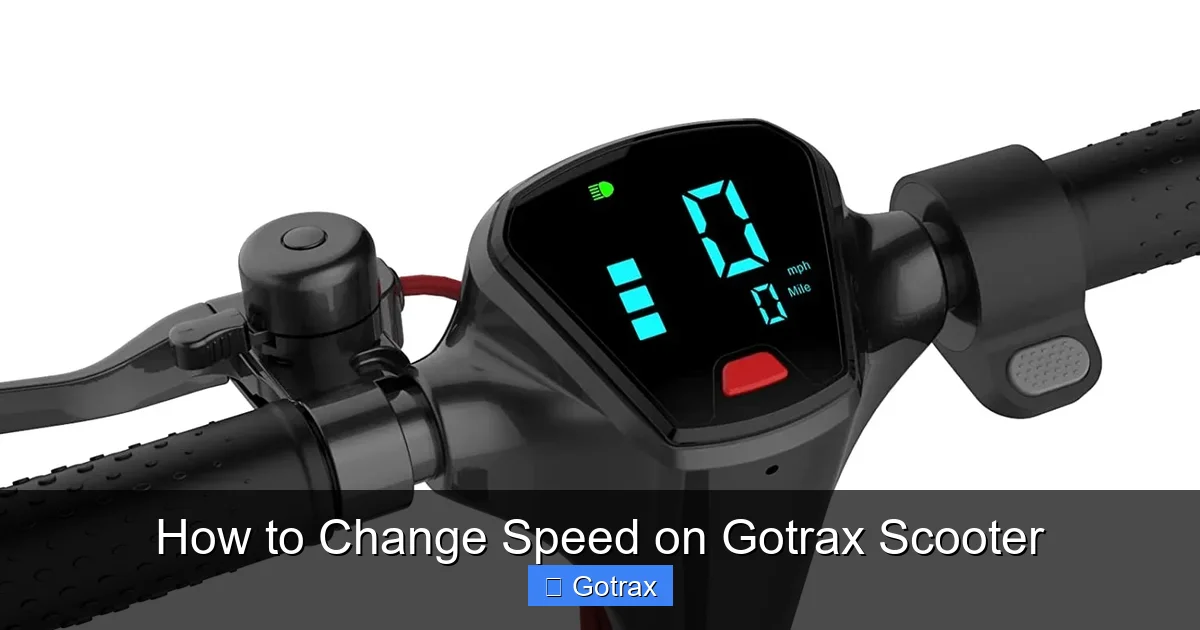
This guide walks you through how to change speed on Gotrax scooter models using built-in speed modes. You’ll learn to switch between Eco, Normal, and Sport settings for better control and battery life.
Key Takeaways
- Most Gotrax scooters have three speed modes: Eco (low), Normal (medium), and Sport (high), easily switched using the throttle or control panel.
- Speed changes are instant and safe: You can shift modes while riding, but it’s best to do so at low speeds for stability.
- Eco mode saves battery: Ideal for longer rides or beginners, it limits top speed to around 9–10 mph.
- Sport mode unlocks full power: Delivers maximum speed (up to 15–18 mph depending on model) but drains the battery faster.
- Always wear safety gear: Especially when using higher speed settings, a helmet and pads are essential.
- Check your model first: Not all Gotrax scooters support multiple speed modes—verify yours before attempting changes.
- Practice in safe areas: Test new speed settings in empty parking lots or quiet streets before riding in traffic.
How to Change Speed on Gotrax Scooter: A Complete Guide
If you’re new to electric scooters or just picked up a Gotrax, you might be wondering: How do I change the speed on my Gotrax scooter? The good news is that most Gotrax models come with multiple speed modes built right in—no tools or complicated setups required. Whether you’re a beginner looking to take it slow or an experienced rider craving more power, this guide will show you exactly how to change speed on Gotrax scooter safely and effectively.
In this comprehensive how-to, we’ll cover everything from understanding your scooter’s speed settings to step-by-step instructions for switching modes. We’ll also share practical tips, troubleshooting advice, and safety reminders to help you get the most out of your ride. By the end, you’ll feel confident adjusting your speed for any situation—whether you’re commuting, cruising around the neighborhood, or just having fun.
Let’s dive in!
Understanding Gotrax Speed Modes
Visual guide about How to Change Speed on Gotrax Scooter
Image source: ridester.com
Before you start pressing buttons, it’s important to understand what speed modes are available on your Gotrax scooter. Most modern Gotrax models—like the GXL V2, XR, XR Elite, and FLEX—feature three distinct speed settings:
- Eco Mode (Low Speed): Limits top speed to around 9–10 mph. Great for beginners, short trips, or conserving battery.
- Normal Mode (Medium Speed): Offers a balanced experience with speeds up to 12–14 mph. Ideal for everyday riding.
- Sport Mode (High Speed): Unlocks the scooter’s full potential, reaching up to 15–18 mph (model-dependent). Best for experienced riders on open roads.
These modes aren’t just about speed—they also affect acceleration, battery consumption, and overall ride feel. For example, Eco mode gives you smoother, gentler acceleration, while Sport mode responds quickly to throttle input. Knowing which mode suits your needs is the first step toward mastering your scooter.
How Speed Modes Work
Gotrax scooters use electronic controllers to regulate motor output based on the selected mode. When you switch modes, the controller adjusts how much power is sent to the motor. This means:
- Lower modes = less power = slower speed and longer battery life.
- Higher modes = more power = faster speed but quicker battery drain.
The system is designed to be user-friendly. You don’t need to stop or restart the scooter to change modes—most allow instant switching. However, it’s always safer to make changes when you’re moving slowly or at a complete stop.
Which Gotrax Models Have Speed Modes?
Not every Gotrax scooter supports multiple speed modes. Here’s a quick breakdown:
- Gotrax GXL V2: Yes – Eco, Normal, Sport
- Gotrax XR: Yes – Eco, Normal, Sport
- Gotrax XR Elite: Yes – Eco, Normal, Sport
- Gotrax FLEX: Yes – Eco, Normal, Sport
- Gotrax G4: Yes – Eco, Normal, Sport
- Gotrax GMAX: Yes – Eco, Normal, Sport
- Gotrax G2 / G3 (older models): Limited or no speed modes – check your manual
If you’re unsure about your model, look for a display screen or LED indicators near the handlebars. Scooters with speed modes usually have a digital dashboard showing battery level, speed, and mode icons.
Step-by-Step: How to Change Speed on Gotrax Scooter
Now that you know what to expect, let’s walk through the actual process of changing speed modes. The method is similar across most Gotrax models, but we’ll highlight any differences.
Step 1: Power On Your Scooter
Before you can change speed, your scooter must be turned on. Here’s how:
- Press and hold the power button (usually located on the left handlebar or near the deck) for 2–3 seconds.
- Wait for the display screen to light up. You should see the battery level, speedometer, and possibly a mode indicator.
- If your scooter has a kick-start feature, give it a gentle push with your foot while squeezing the throttle to begin moving.
Tip: Always ensure the scooter is on a flat, stable surface when powering on. Avoid hills or uneven ground during startup.
Step 2: Locate the Mode Button
The mode button is typically found on the right handlebar, near the throttle. It’s often labeled “M” or “Mode” and may be a small, recessed button. On some models, it’s integrated into the display panel.
- Look for a button with an icon resembling a speedometer or arrows.
- On scooters with a digital display, the mode indicator (E, N, S) will appear when you press the button.
Example: On the Gotrax XR, the mode button is a small black button just below the throttle. Pressing it cycles through Eco (E), Normal (N), and Sport (S).
Step 3: Cycle Through Speed Modes
Once you’ve found the mode button, changing speed is as simple as pressing it:
- Press the mode button once to switch to the next setting.
- Each press cycles in order: Eco → Normal → Sport → Eco (and so on).
- The display will update instantly to show the new mode (e.g., “E” for Eco, “S” for Sport).
Important: You can change modes while riding, but for safety, do so when moving slowly or at a stop. Sudden acceleration in Sport mode can cause loss of control, especially for new riders.
Step 4: Confirm the Change
After pressing the mode button, test the new setting:
- Gently squeeze the throttle to feel the difference in acceleration.
- In Eco mode, the scooter will feel smoother and less responsive.
- In Sport mode, you’ll notice quicker pickup and higher top speed.
Pro Tip: If you don’t feel a change, double-check that the mode indicator on the display has updated. Sometimes a weak battery or software glitch can prevent mode switching.
Step 5: Adjust Riding Style Accordingly
Each speed mode requires a slightly different approach:
- Eco Mode: Perfect for learning. Ride gently, avoid sudden throttle bursts, and enjoy longer battery life.
- Normal Mode: Great for daily commutes. Offers a good balance of speed and efficiency.
- Sport Mode: Use on open roads with minimal traffic. Be extra cautious—higher speeds mean longer stopping distances.
Remember: How to change speed on Gotrax scooter isn’t just about pressing a button—it’s about adapting your riding style to match the mode.
Practical Tips for Safe Speed Changes
Changing speed modes is easy, but doing it safely is key. Here are some practical tips to keep in mind:
Always Wear Safety Gear
No matter the speed, safety comes first. Wear a helmet, knee pads, and elbow pads—especially when testing higher modes. A good helmet can prevent serious injury in case of a fall.
Practice in a Safe Area
Before taking your scooter into traffic, practice mode changes in a quiet, open space like a parking lot or empty street. This helps you get comfortable with how each mode feels.
Monitor Battery Level
Higher speed modes drain the battery faster. If your battery is below 30%, avoid Sport mode—it may cause the scooter to slow down unexpectedly or shut off mid-ride.
Avoid Sudden Throttle in Sport Mode
Sport mode delivers instant power. If you squeeze the throttle too hard from a stop, the scooter can lurch forward. Start gently and build up speed gradually.
Use Eco Mode in Crowded Areas
In busy sidewalks, parks, or near pedestrians, lower speeds are safer. Eco mode gives you better control and reduces the risk of accidents.
Check Tire Pressure Regularly
Underinflated tires can affect handling, especially at higher speeds. Keep tires inflated to the recommended PSI (usually printed on the tire sidewall).
Troubleshooting Common Issues
Sometimes, changing speed modes doesn’t work as expected. Here’s how to fix common problems:
Mode Button Not Responding
If pressing the mode button does nothing:
- Check if the scooter is fully powered on.
- Ensure the battery has enough charge (low battery can disable features).
- Try turning the scooter off and on again.
- If the issue persists, consult the user manual or contact Gotrax support.
Speed Doesn’t Change After Mode Switch
If the display shows a new mode but the scooter still rides the same:
- You may be at the speed limit for that mode. Try accelerating to see if the top speed increases.
- The motor might be overheating. Let the scooter cool down for 10–15 minutes.
- There could be a software glitch. Perform a full reset by turning the scooter off, waiting 30 seconds, and turning it back on.
Scooter Jerks or Stutters in Sport Mode
This could be due to:
- A weak or aging battery. Replace if it’s more than 2–3 years old.
- Dirty or worn throttle. Clean the throttle grip and check for damage.
- Motor issues. If problems continue, seek professional servicing.
Display Shows Wrong Mode
If the screen says “Sport” but the scooter feels slow:
- The mode sensor might be faulty.
- Try cycling through all modes multiple times to reset the system.
- Update the firmware if your model supports it (check Gotrax website).
Maximizing Battery Life While Using Speed Modes
One of the biggest benefits of speed modes is battery management. Here’s how to get the most out of your charge:
Use Eco Mode for Long Rides
Eco mode can extend your range by 20–30% compared to Sport mode. If you’re planning a long trip, start in Eco and only switch up when needed.
Avoid Constant Speed Changes
Frequent switching between modes can confuse the controller and waste energy. Choose a mode that fits your route and stick with it.
Combine with Smooth Riding
Even in Sport mode, smooth acceleration and braking save battery. Avoid stop-and-go riding when possible.
Charge Regularly
Keep your battery between 20% and 80% for optimal lifespan. Avoid letting it drop to 0% frequently.
Advanced Tips for Experienced Riders
Once you’ve mastered the basics, try these advanced techniques:
Use Sport Mode for Hills
Sport mode provides extra torque for climbing inclines. Switch to Sport before starting up a hill to maintain speed.
Switch to Eco on Descents
Going downhill? Switch to Eco to reduce speed and prevent overshooting your target velocity.
Customize Your Ride
Some Gotrax models allow firmware updates that tweak speed limits or acceleration curves. Check the Gotrax app or website for updates.
Track Your Rides
Use a phone app or GPS tracker to monitor speed, distance, and battery usage. This helps you understand how each mode affects performance.
Safety Reminders
No guide on how to change speed on Gotrax scooter is complete without a strong safety message:
- Always obey local laws and speed limits.
- Never ride on highways or busy roads unless permitted.
- Use lights and reflectors at night.
- Keep both hands on the handlebars.
- Never ride under the influence of alcohol or drugs.
- Inspect your scooter before each ride—check brakes, tires, and lights.
Remember: Speed is fun, but safety is non-negotiable.
Conclusion
Changing the speed on your Gotrax scooter is simple, safe, and incredibly useful. Whether you’re easing into your first ride in Eco mode or pushing the limits in Sport, understanding how to switch modes gives you greater control, better battery life, and a more enjoyable experience.
By following this guide, you now know exactly how to change speed on Gotrax scooter—from locating the mode button to troubleshooting common issues. Use the tips and techniques here to ride smarter, safer, and more confidently.
So go ahead—press that mode button, feel the difference, and enjoy the ride. Just remember: with great speed comes great responsibility. Stay safe, stay aware, and keep exploring!