
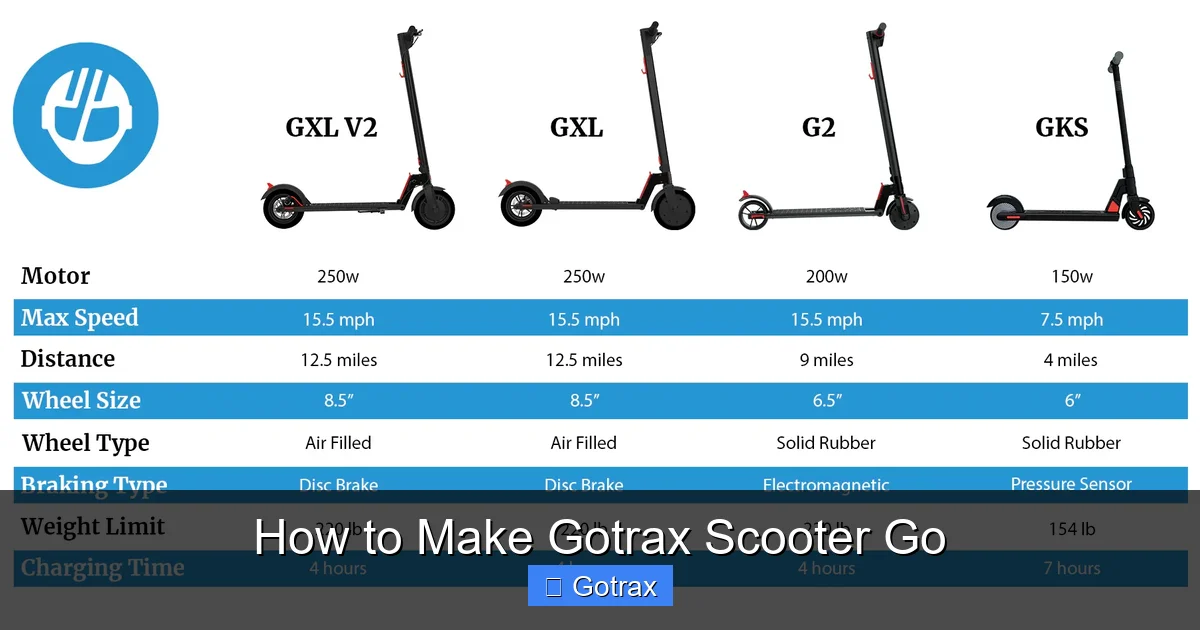
Wondering how to make your Gotrax scooter go? This guide walks you through essential steps—from charging and safety checks to troubleshooting common issues—so you can ride safely and confidently. Get your scooter moving in minutes with expert tips and clear instructions.
Key Takeaways
- Always charge your Gotrax scooter fully before first use: A dead or low battery is the most common reason scooters won’t start.
- Check the power button and LED indicators: These give quick clues about battery status and system health.
- Ensure the scooter is in “ride mode” and not locked: Many Gotrax models have a safety lock that prevents accidental starts.
- Inspect tires, brakes, and throttle for obstructions: Physical blockages can prevent the motor from engaging.
- Use the correct riding technique: Push off with your foot before engaging the throttle for smoother acceleration.
- Update firmware if available: Gotrax occasionally releases updates that improve performance and fix bugs.
- Contact customer support if problems persist: Gotrax offers reliable support for warranty and technical issues.
How to Make Gotrax Scooter Go: A Complete Step-by-Step Guide
So you’ve got your brand-new Gotrax scooter—or maybe it’s been sitting in the garage for a while—and you’re ready to hit the pavement. But when you press the throttle, nothing happens. Don’t panic! Most Gotrax scooter issues are easy to fix with a few simple steps.
In this guide, we’ll walk you through everything you need to know to make your Gotrax scooter go—safely, smoothly, and reliably. Whether you’re a first-time rider or troubleshooting a scooter that won’t start, this comprehensive how-to will cover charging, safety checks, proper riding technique, and common fixes. By the end, you’ll be cruising down the sidewalk with confidence.
Let’s get your Gotrax scooter moving!
Step 1: Charge Your Gotrax Scooter Fully
The number one reason a Gotrax scooter won’t go is a dead or low battery. Even if the scooter was fully charged when you bought it, batteries can lose charge over time—especially if it’s been stored for weeks or months.
How to Charge Your Gotrax Scooter
Locate the charging port on your scooter—it’s usually on the deck near the front wheel. Plug in the charger that came with your model. The LED light on the charger will typically turn red while charging and green when complete.

Visual guide about How to Make Gotrax Scooter Go
Image source: scooterinsights.com
Most Gotrax scooters take between 4 to 6 hours to charge fully. Avoid using third-party chargers, as they can damage the battery or cause overheating. Always charge in a dry, cool area away from flammable materials.
Check the Battery Indicator
Once charged, turn on your scooter by pressing and holding the power button for 2–3 seconds. Look at the LED battery indicator on the handlebar. A full battery shows 4–5 solid lights. If only 1–2 lights are on, the scooter may not have enough power to run.
Pro Tip: Charge your scooter after every ride, even if it’s not fully drained. Lithium-ion batteries (used in Gotrax scooters) last longer when kept between 20% and 80% charge.
Step 2: Turn On the Scooter Correctly
Gotrax scooters have a simple power system, but it’s easy to miss a step—especially if you’re new to electric scooters.
Power On Procedure
Press and hold the power button on the handlebar for 2–3 seconds until you hear a beep and see the LED lights illuminate. If nothing happens, the battery may be too low, or the scooter could be in sleep mode.
Some models, like the Gotrax GXL or XR, have a “sleep mode” that activates after 10–15 minutes of inactivity. To wake it up, simply press the power button again.
Check for Safety Lock
Many Gotrax scooters come with a built-in safety lock to prevent accidental starts—especially useful if kids are around. To unlock, press and hold the power button for 5 seconds until you hear a double beep or see the lights flash.
If your scooter still won’t start, try turning it off completely, waiting 10 seconds, and turning it back on. This resets the control board and often resolves minor glitches.
Step 3: Ensure the Scooter Is in Ride Mode
Gotrax scooters have different modes, and if you’re in the wrong one, the throttle won’t respond.
Understanding Ride Modes
Most Gotrax models have two or three speed modes:
- Eco Mode (Low Speed): Ideal for beginners or crowded areas. Limited to around 9–10 mph.
- Normal Mode (Medium Speed): Balanced speed and battery life. Around 12–15 mph.
- Sport Mode (High Speed): Maximum speed, up to 15–18 mph depending on the model.
To switch modes, press the mode button (usually labeled “M”) on the handlebar. Each press cycles through the available modes, and the LED display will show the current setting.
Make Sure Throttle Is Enabled
The throttle won’t work if the scooter is in “walk mode” or if the kickstand is down. Always lift the kickstand fully before riding. Some models also disable the throttle if the brake lever is pressed—so make sure your hand isn’t resting on the brake.
Important: Never press the throttle while the scooter is stationary and upright without pushing off first. This can strain the motor. We’ll cover proper riding technique next.
Step 4: Use the Correct Riding Technique
Even with a fully charged scooter, improper technique can make it seem like the scooter won’t go.
Start with a Push-Off
Gotrax scooters are designed to be kick-started. Stand on the deck with one foot, push off with the other foot to gain a little momentum (about 3–5 mph), then gently twist the throttle.
This reduces strain on the motor and helps the scooter engage smoothly. Trying to start from a complete stop using only the throttle can cause jerky movement or no response at all.
Gradual Throttle Control
Twist the throttle slowly and steadily. Sudden, full twists can trigger the scooter’s safety cut-off or cause you to lose balance. Practice in an open, flat area like a parking lot or quiet street.
Tip: Keep your weight centered over the deck and bend your knees slightly for better control. Avoid leaning too far forward or backward, especially when starting.
Step 5: Inspect for Physical Obstructions
Sometimes, the scooter won’t go because something is physically blocking it.
Check the Wheels and Tires
Look at both front and rear wheels. Make sure nothing is stuck in the tire treads—like rocks, sticks, or debris. Spin the wheels by hand to see if they rotate freely.
If a wheel feels stiff or won’t turn, the motor may be jammed or the brake could be dragging. For rear-wheel-drive models (like the Gotrax G4), the rear wheel is powered—so any resistance there is critical.
Inspect the Brake System
Gotrax scooters use either foot brakes (rear fender press) or hand brakes (lever on handlebar). If the brake is partially engaged, it can prevent the motor from spinning.
Check that the brake lever isn’t stuck or too tight. Adjust the brake cable if needed, or clean the brake pads if they’re worn or dirty.
Look for Loose or Damaged Parts
Inspect the deck, stem, and handlebars for cracks, loose screws, or bent components. A wobbly stem or loose bolts can affect stability and safety—and may cause the scooter to shut down as a protective measure.
Tighten any loose parts with the appropriate tools (usually included with the scooter). If you see significant damage, stop riding and contact Gotrax support.
Step 6: Check the Motor and Electrical Connections
If the scooter still won’t go after the above steps, the issue may be electrical.
Listen for Motor Sounds
When you twist the throttle, do you hear a faint hum or whir from the motor? If yes, the motor is receiving power but may be blocked. If no sound at all, there could be a wiring issue or blown fuse.
Gotrax scooters have internal fuses that protect the battery and motor. If the fuse blows (due to a short circuit or overload), the scooter won’t start. Unfortunately, fuses are not user-replaceable—you’ll need to contact Gotrax for repair.
Check the Battery Connections
Over time, vibration can loosen the battery connections inside the deck. While you can’t easily access these without disassembling the scooter, you can listen for clicking sounds or intermittent power loss, which may indicate a loose connection.
If your scooter turns on but dies suddenly during a ride, this could be a sign of a failing battery or loose wiring. Gotrax offers battery replacement services for out-of-warranty scooters.
Step 7: Update Firmware (If Available)
Gotrax occasionally releases firmware updates to improve performance, fix bugs, or enhance safety features.
How to Check for Updates
Visit the official Gotrax website and navigate to the support or downloads section. Look for your specific model (e.g., Gotrax GXL V2, XR Elite, etc.) and see if a firmware update is available.
Updates are usually installed via a USB cable and a computer. Follow the instructions carefully—interrupting an update can brick the scooter’s control board.
Note: Not all Gotrax models support firmware updates. Check your user manual or contact customer service to confirm.
Step 8: Troubleshoot Common Gotrax Scooter Problems
Even with proper care, issues can arise. Here are some common problems and quick fixes.
Scooter Turns On But Won’t Move
- Cause: Throttle not engaged, brake pressed, or safety lock active.
- Fix: Release the brake, ensure the kickstand is up, and try the throttle again. Unlock the scooter if needed.
Scooter Jerks or Stutters When Starting
- Cause: Starting from a complete stop without push-off.
- Fix: Always kick off first, then apply gentle throttle.
Battery Drains Quickly
- Cause: Old battery, cold weather, or riding uphill frequently.
- Fix: Charge after every use, avoid extreme temperatures, and ride on flat terrain when possible.
LED Lights Flash or Blink
- Cause: Error code indicating a system issue (e.g., motor overload, low battery, or sensor fault).
- Fix: Refer to your user manual for flash code meanings. Common fixes include restarting the scooter or checking connections.
Scooter Won’t Charge
- Cause: Faulty charger, dirty charging port, or dead battery.
- Fix: Try a different outlet, clean the charging port with a dry cloth, or test with a known-good charger.
Step 9: Maintain Your Gotrax Scooter for Long-Term Performance
Regular maintenance keeps your scooter running smoothly and prevents future issues.
Weekly Checks
- Inspect tires for wear and proper inflation (if pneumatic).
- Check bolts and screws for tightness.
- Clean the deck and wheels with a damp cloth.
- Test the brakes and throttle response.
Monthly Maintenance
- Lubricate the folding mechanism (if applicable) with silicone spray.
- Check the battery health—look for swelling, leaks, or unusual heat.
- Store in a dry, temperature-controlled environment.
Battery Care Tips
- Avoid fully draining the battery regularly.
- Don’t leave the scooter plugged in overnight after it’s fully charged.
- Store with 50% charge if not using for more than a month.
When to Contact Gotrax Customer Support
If you’ve tried all the steps above and your scooter still won’t go, it’s time to reach out for help.
Gotrax offers excellent customer support, including phone, email, and live chat. They can diagnose issues, provide repair options, and honor warranties (typically 90 days to 1 year, depending on the model).
What to Have Ready
- Your scooter’s model number (found on the deck or user manual).
- Purchase date and proof of purchase.
- Description of the problem and steps you’ve already tried.
- Photos or videos of the issue (if applicable).
Most issues can be resolved remotely, but if hardware repair is needed, Gotrax may send a replacement part or authorize a local service center.
Final Thoughts: Ride Safe and Smart
Making your Gotrax scooter go isn’t just about pressing a button—it’s about understanding how the scooter works and treating it with care. From charging properly to using the right technique, small habits make a big difference in performance and longevity.
Remember: safety first. Always wear a helmet, follow local traffic laws, and avoid riding in wet or icy conditions. Gotrax scooters are built for fun and convenience, but they’re not toys—they’re electric vehicles that deserve respect.
With this guide, you’re now equipped to troubleshoot, maintain, and enjoy your Gotrax scooter to the fullest. So charge up, kick off, and hit the road—your next adventure is just a throttle twist away.