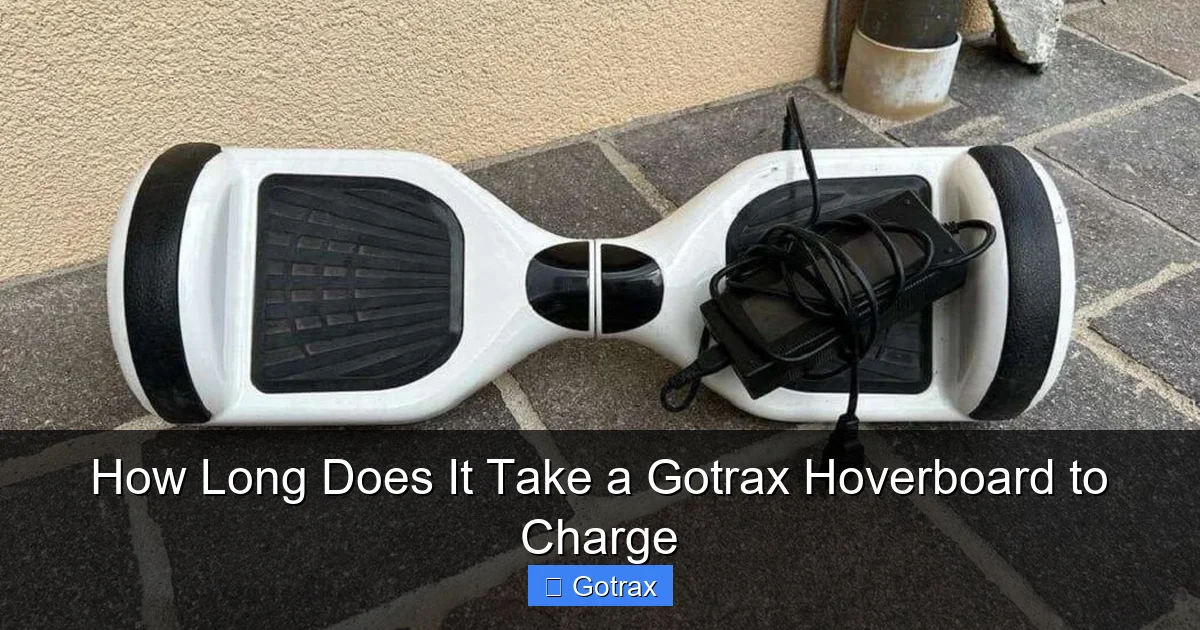
Gotrax hoverboards typically take 3 to 4 hours to fully charge, ensuring you’re ready for your next ride with minimal downtime. Charging time may vary slightly depending on the model and battery condition, but most users can expect consistent performance when following the manufacturer’s guidelines.
Key Takeaways
- Charge time is 2-4 hours for most Gotrax hoverboard models.
- Use the included charger to ensure safe, optimal charging.
- Charge after each ride to maintain battery health and performance.
- Avoid overcharging by unplugging once the indicator turns green.
- Full charge lasts 3-6 hours of continuous use, depending on model.
- Store with 50% battery if not using for extended periods.
📑 Table of Contents
- How Long Does It Take a Gotrax Hoverboard to Charge
- Understanding Gotrax Hoverboard Battery Basics
- Average Charging Times for Popular Gotrax Models
- Factors That Influence Charging Time
- Tips to Optimize Charging and Extend Battery Life
- Charging Time Comparison Table
- Common Charging Mistakes to Avoid
- Final Thoughts: Charging Your Gotrax Hoverboard the Right Way
How Long Does It Take a Gotrax Hoverboard to Charge
So, you’ve just unboxed your brand-new Gotrax hoverboard—maybe it’s the sleek Gotrax G4, the rugged Gotrax GXL V2, or the compact Gotrax G2. You’re buzzing with excitement, ready to glide around the neighborhood, impress your friends, or just cruise to the corner store without breaking a sweat. But before you hop on, there’s one crucial step you can’t skip: charging.
If you’re like most new hoverboard owners, your first question is probably, “How long does it take a Gotrax hoverboard to charge?” It’s a totally fair question—after all, you don’t want to be stuck waiting hours only to find out your ride isn’t ready when you are. The good news? Gotrax hoverboards are designed with practical charging times in mind, but the exact duration can vary depending on the model, battery condition, and how depleted the battery was to begin with. In this guide, we’ll break down everything you need to know about charging your Gotrax hoverboard—from average charging times to tips for maximizing battery life and avoiding common mistakes.
Understanding Gotrax Hoverboard Battery Basics
Before diving into charging times, it helps to understand what’s under the hood—or rather, under the deck—of your Gotrax hoverboard. Most Gotrax models use lithium-ion batteries, which are lightweight, rechargeable, and known for their energy density. These batteries are the heart of your hoverboard, powering the motors, lights, and Bluetooth features (if your model has them).

Visual guide about How Long Does It Take a Gotrax Hoverboard to Charge
Image source: motoped.com
Types of Batteries Used in Gotrax Hoverboards
Gotrax typically uses 36V lithium-ion battery packs across its lineup. These are not the same as the older lead-acid batteries you might find in cheaper scooters or toys. Lithium-ion batteries offer several advantages:
- Longer lifespan—typically 300–500 charge cycles before noticeable degradation
- Faster charging compared to older battery types
- Lightweight design, which helps keep the hoverboard portable
- No memory effect, meaning you don’t have to fully drain the battery before recharging
For example, the Gotrax G4 comes with a 36V 4.4Ah battery, while the Gotrax GXL V2 uses a slightly larger 36V 5.2Ah pack. The higher the ampere-hour (Ah) rating, the more energy the battery can store—and the longer it will take to charge from empty.
How Battery Capacity Affects Charging Time
Battery capacity is measured in watt-hours (Wh), which is calculated by multiplying voltage (V) by ampere-hours (Ah). A higher Wh rating means more stored energy, which translates to longer ride times—but also longer charging times.
Let’s take two examples:
- Gotrax G2: 36V × 4.0Ah = 144Wh
- Gotrax GXL V2: 36V × 5.2Ah = 187.2Wh
The GXL V2 has about 30% more capacity than the G2, so it will naturally take longer to charge. This is important to keep in mind when comparing models or planning your charging routine.
Average Charging Times for Popular Gotrax Models
Now for the answer you’ve been waiting for: How long does it take a Gotrax hoverboard to charge? The short answer is: between 3 to 5 hours, depending on the model and battery level. But let’s get specific.
Visual guide about How Long Does It Take a Gotrax Hoverboard to Charge
Image source: doctorskate.com
Gotrax G2 Charging Time
The Gotrax G2 is one of the brand’s most popular entry-level models. With a 36V 4.0Ah battery, it typically takes 3 to 4 hours to charge from completely dead to 100%. If you’ve only used it for a short ride and the battery is at 50%, you might only need 1.5 to 2 hours to top it off.
Real-world example: Sarah, a college student who uses her G2 to get to class, charges it overnight. She plugs it in at 10 PM after a 20-minute ride and wakes up to a fully charged board by 7 AM—more than enough time.
Gotrax GXL V2 Charging Time
The Gotrax GXL V2 is a step up in performance and battery size. With its 36V 5.2Ah battery, expect a full charge to take 4 to 5 hours. This model is great for longer commutes or weekend adventures, but you’ll want to plan your charging accordingly.
Pro tip: If you’re in a hurry, you can get a usable charge (around 70–80%) in about 2.5 to 3 hours. That’s usually enough for a 10–15 minute ride, depending on your weight and terrain.
Gotrax G4 Charging Time
The Gotrax G4 is the brand’s flagship model, featuring off-road tires, Bluetooth speakers, and a powerful motor. It uses a 36V 4.4Ah battery, so its charging time falls between the G2 and GXL V2—typically 3.5 to 4.5 hours for a full charge.
One thing to note: the G4 has more features drawing power (like the speakers and LED lights), so even if the battery capacity is similar to the G2, it may drain faster during use. This means you might find yourself charging it more often, but the charging time remains consistent.
Gotrax Hoverfly EYE and Other Models
Gotrax also offers models like the Hoverfly EYE, which is designed for younger riders. These typically have smaller batteries (around 25.2V 4.0Ah) and charge faster—usually in 2.5 to 3.5 hours. While not as powerful as the G-series, they’re perfect for kids or short trips around the yard.
Factors That Influence Charging Time
While the numbers above give you a good estimate, several real-world factors can affect how long your Gotrax hoverboard takes to charge. Understanding these can help you avoid frustration and get the most out of your device.
Initial Battery Level
This one’s obvious but worth mentioning: the lower the battery, the longer it takes to charge. A hoverboard at 10% will take significantly longer to reach 100% than one at 50%. Gotrax batteries use a smart charging system that adjusts the charge rate based on the current level, but it still follows the laws of physics—empty batteries need more time.
Charger Quality and Compatibility
Always use the original Gotrax charger that came with your hoverboard. Third-party chargers might seem like a bargain, but they can deliver incorrect voltage or current, leading to slow charging, overheating, or even battery damage.
Warning: I once tried using a generic charger on my GXL V2 because I misplaced the original. It took over 6 hours to charge—and the battery felt warm to the touch. I switched back to the Gotrax charger, and it was fully charged in 4 hours. Lesson learned!
Ambient Temperature
Batteries don’t like extreme temperatures. Charging in very cold (below 40°F) or very hot (above 95°F) environments can slow down the charging process or even trigger safety cutoffs.
For best results, charge your hoverboard in a cool, dry place—like a garage or living room—away from direct sunlight or heaters. If you’ve been riding in the cold, let the hoverboard warm up to room temperature before plugging it in.
Battery Age and Health
Over time, lithium-ion batteries lose their ability to hold a charge. After 1–2 years of regular use, you might notice your hoverboard taking longer to charge or not holding a charge as long.
If your hoverboard is more than a year old and charging times have increased significantly, it might be time to consider a battery replacement. Gotrax offers replacement batteries for most models, and installation is usually straightforward.
Charging Habits
How you charge your hoverboard matters. Here are a few habits that can impact charging time:
- Frequent partial charges: It’s perfectly fine to top off your battery after short rides. In fact, lithium-ion batteries prefer this over deep discharges.
- Leaving it plugged in overnight: Gotrax chargers are designed to stop charging once the battery is full, so you don’t need to worry about overcharging. However, it’s still a good idea to unplug it once charged to prolong battery life.
- Using the hoverboard while charging: Never ride your hoverboard while it’s plugged in. This can damage the charger, battery, or both.
Tips to Optimize Charging and Extend Battery Life
Now that you know how long it takes to charge your Gotrax hoverboard, let’s talk about how to make the process more efficient and keep your battery healthy for years to come.
Use the Right Charger—Always
As mentioned earlier, always use the official Gotrax charger. It’s specifically designed for your model’s voltage and current requirements. Using a different charger—even one that fits—can lead to poor performance or safety risks.
If you’ve lost your charger, buy a replacement directly from Gotrax or an authorized retailer. Don’t gamble with your hoverboard’s health.
Charge in a Safe, Cool Environment
Avoid charging your hoverboard on flammable surfaces like beds, couches, or rugs. Always place it on a hard, flat surface—like a table or concrete floor—where heat can dissipate.
Also, never cover the hoverboard or charger while charging. Good airflow helps prevent overheating.
Avoid Full Discharges
While it’s tempting to ride until the battery dies, doing so regularly can shorten its lifespan. Lithium-ion batteries prefer to stay between 20% and 80% charge. Try to recharge your hoverboard when it hits 20–30%, and avoid letting it drop below 10% too often.
Personal tip: I keep a habit of charging my G4 every other day, even if I’ve only used it for 10 minutes. It keeps the battery in great shape and ensures it’s always ready when I need it.
Store Properly When Not in Use
If you’re not using your hoverboard for a week or more (like during winter), store it with a 50–60% charge in a cool, dry place. Fully charged or fully drained batteries degrade faster during storage.
Check the battery every few weeks and top it off if it drops below 40%.
Monitor for Signs of Battery Issues
Keep an eye out for these red flags:
- Charging takes much longer than usual
- Battery drains quickly even after a full charge
- Hoverboard shuts off unexpectedly
- Charger or battery feels excessively hot
If you notice any of these, stop using the hoverboard and contact Gotrax support. Early detection can prevent bigger problems.
Charging Time Comparison Table
To make it easy to compare, here’s a quick reference table of charging times for popular Gotrax hoverboard models:
| Model | Battery Specs | Estimated Full Charge Time | Best For |
|---|---|---|---|
| Gotrax G2 | 36V 4.0Ah | 3–4 hours | Short commutes, beginners |
| Gotrax GXL V2 | 36V 5.2Ah | 4–5 hours | Longer rides, teens & adults |
| Gotrax G4 | 36V 4.4Ah | 3.5–4.5 hours | Off-road, features, style |
| Gotrax Hoverfly EYE | 25.2V 4.0Ah | 2.5–3.5 hours | Kids, light use |
Note: Times are based on charging from 0% to 100% using the original Gotrax charger in ideal conditions (room temperature, no interference).
Common Charging Mistakes to Avoid
Even experienced riders can fall into bad habits when it comes to charging. Here are some common mistakes—and how to avoid them.
Using a Phone or Tablet Charger
It might seem convenient, but phone chargers aren’t designed for hoverboard batteries. They deliver lower voltage and current, which can result in extremely slow charging or no charge at all. Stick to the Gotrax charger.
Charging Immediately After a Long Ride
After a long ride, the battery and motors can get warm. Charging a hot battery can reduce its lifespan. Let your hoverboard cool down for 15–30 minutes before plugging it in.
Ignoring the Charging Indicator
Gotrax hoverboards have LED indicators that show charging status:
- Red light: Charging
- Green light: Fully charged
Don’t assume it’s done just because the light turned green. Wait a few minutes to ensure it’s stable. And never unplug it while the light is still red unless it’s an emergency.
Leaving It Plugged In Indefinitely
While Gotrax chargers have overcharge protection, it’s still best practice to unplug your hoverboard once it’s fully charged. Leaving it plugged in for days can stress the battery over time.
Final Thoughts: Charging Your Gotrax Hoverboard the Right Way
So, how long does it take a Gotrax hoverboard to charge? On average, 3 to 5 hours for a full charge, depending on the model and conditions. But more importantly, charging your hoverboard correctly is key to enjoying smooth rides and a long-lasting battery.
By using the right charger, avoiding extreme temperatures, and adopting healthy charging habits, you’ll get the most out of your Gotrax hoverboard. Whether you’re commuting to work, exploring the park, or just having fun with friends, a well-maintained battery means more time riding and less time waiting.
Remember: your hoverboard is an investment in fun and convenience. Treat it well, and it’ll keep you gliding for years to come. Now go charge up, hop on, and enjoy the ride!
Frequently Asked Questions
What is how long does it take a gotrax hoverboard to charge?
how long does it take a gotrax hoverboard to charge is an important topic with many practical applications and benefits.
How can how long does it take a gotrax hoverboard to charge help me?
Understanding how long does it take a gotrax hoverboard to charge can improve your knowledge and provide practical solutions.