
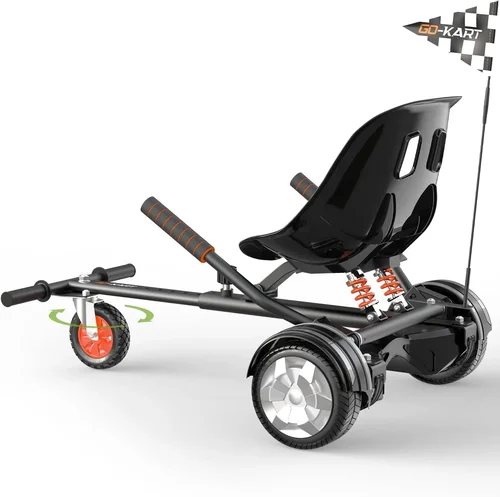
If you’re in the market for a hoverboard in 2026, you’re not just looking for a fun ride—you’re investing in personal mobility, safety, and long-term value. With the electric personal transport industry evolving at lightning speed, today’s hoverboards are smarter, safer, and more capable than ever before. From improved battery technology and enhanced gyroscopic sensors to sleek designs and app connectivity, the options are vast—and sometimes overwhelming. That’s exactly why this guide exists: to cut through the noise and help you make a confident, informed decision.
This comprehensive buying guide is designed for everyone—from first-time riders to seasoned enthusiasts—who want to find the best hoverboard on Amazon in 2026. Whether you’re shopping for a kid’s birthday gift, a college commuter, or a weekend joyride, we’ll walk you through every critical factor that should influence your purchase. You’ll learn how to evaluate performance specs, understand safety certifications, compare brands like Gotrax, Razor, and Segway, and avoid common pitfalls that cost buyers time and money. By the end of this guide, you won’t just know which hoverboard to buy—you’ll know why it’s the right choice for your needs.
The hoverboard market has matured significantly since its viral debut over a decade ago. Gone are the days of fire-prone lithium batteries and wobbly, unreliable rides. Today’s top models feature UL 2272 certification, all-terrain tires, Bluetooth speakers, LED lighting, and even smartphone app integration. Amazon remains one of the most popular platforms for purchasing hoverboards, offering competitive pricing, fast shipping, and access to thousands of verified customer reviews. However, with so many options available—ranging from $100 budget models to $600+ premium machines—it’s easy to get lost in the details. This guide will serve as your trusted roadmap, helping you navigate features, pricing, and performance to find the perfect hoverboard for your lifestyle.

What to Look for When Buying a Hoverboard
1. Safety Certifications and Compliance
Safety should always be your top priority when buying a hoverboard. The most important certification to look for is UL 2272, which ensures the device meets rigorous electrical and fire safety standards set by Underwriters Laboratories. This certification covers battery management systems, charging circuits, and overall electrical integrity—critical factors that prevent overheating, short circuits, and potential fires. In 2026, all reputable hoverboard manufacturers include UL 2272 certification, but it’s still essential to verify it before purchasing. Check the product description, packaging, or manufacturer’s website for official certification details.
Another safety feature to consider is overcharge protection, which prevents the battery from being damaged during extended charging. Look for models with automatic shut-off when the battery reaches 100%. Additionally, non-slip foot pads and low-center-of-gravity designs improve stability, especially for younger or less experienced riders. Some advanced models also include tilt-back alerts that gently slow the board when you approach the speed limit, helping prevent falls due to sudden stops or loss of balance.
2. Battery Life and Charging Time
Battery performance directly impacts how far and how long you can ride. Most modern hoverboards use lithium-ion batteries, which offer a good balance of energy density, lifespan, and safety. When evaluating battery life, look for the watt-hour (Wh) rating and estimated range in miles or kilometers. For example, a 36V 4.4Ah battery (158.4Wh) typically delivers 8–12 miles of range, depending on rider weight, terrain, and speed.
Charging time is equally important. Most hoverboards take between 2 to 4 hours to fully charge, but some premium models now feature fast-charging technology that reduces this to under 90 minutes. If you plan to use your hoverboard for commuting or frequent rides, a shorter charging time can be a game-changer. Also, consider the battery lifespan—quality lithium-ion batteries can last 300–500 charge cycles before significant degradation. Some brands, like Segway, offer replaceable batteries, which can extend the hoverboard’s usable life.
3. Motor Power and Performance
The motor is the heart of your hoverboard, determining its speed, acceleration, and ability to handle inclines. Most consumer hoverboards feature dual motors, one for each wheel, with power ratings ranging from 250W to 500W per motor. A 500W dual-motor setup (1000W total) is ideal for adults and hilly terrain, while 250W motors are sufficient for kids and flat surfaces.
Look for models that specify maximum speed (typically 6–10 mph) and hill-climbing ability (usually 10–15 degrees). If you live in an area with steep driveways or sidewalks, opt for a hoverboard with at least 350W per motor. Performance also depends on torque response—how quickly the motors react to your body movements. High-quality gyroscopic sensors and responsive motors provide smoother, more intuitive control, especially during turns and sudden stops.
4. Tire Type and Terrain Compatibility
Hoverboard tires come in two main types: solid rubber and pneumatic (air-filled). Solid tires are puncture-proof and require no maintenance, making them ideal for urban environments with paved sidewalks and smooth surfaces. However, they offer less shock absorption, which can make rides feel bumpy on uneven terrain.
Pneumatic tires, on the other hand, provide a smoother, more comfortable ride and better traction on grass, gravel, or light off-road paths. They’re perfect for all-terrain hoverboards but require occasional air pressure checks and are vulnerable to punctures. Some models feature self-healing tires with sealant inside to prevent flats. If you plan to ride on varied surfaces, consider a hoverboard with 6.5-inch or larger pneumatic tires and a robust suspension system.
5. Weight Capacity and Rider Suitability
Every hoverboard has a maximum weight limit, typically ranging from 165 lbs to 265 lbs. Exceeding this limit can damage the motors, reduce battery life, and compromise safety. Always check the manufacturer’s specifications and choose a model that comfortably supports your weight—ideally with a 10–20% buffer.
For children, look for hoverboards with beginner modes that limit speed and sensitivity. Many models now include app-controlled speed settings, allowing parents to restrict top speed until the rider gains confidence. Adult riders should prioritize stability, power, and range, while teens may appreciate features like Bluetooth speakers and LED lights.
6. Build Quality and Durability
A well-built hoverboard should withstand daily use, minor drops, and exposure to weather. Look for a reinforced ABS plastic or aluminum alloy frame that resists cracking and bending. The deck should be sturdy enough to support repeated mounting and dismounting without flexing.
Water resistance is another key factor. While most hoverboards are not fully waterproof, many are rated IP54 or IP65, meaning they can handle light rain, splashes, and dust. Avoid riding through puddles or wet grass unless the model is specifically designed for wet conditions. Also, inspect the wheel bearings and axle assembly—cheap models often use plastic components that wear out quickly.
7. Features and Smart Functionality
Modern hoverboards come packed with features that enhance the riding experience. Bluetooth connectivity allows you to stream music through built-in speakers, while LED headlights and underglow lighting improve visibility and style. Some models include mobile apps that let you track speed, battery level, ride history, and even lock the board remotely.
Other useful features include self-balancing modes for easier mounting, 360-degree spinning capability for tricks, and carry handles for portability. While these extras don’t affect core performance, they can significantly improve usability and fun factor—especially for younger riders or those using the hoverboard for entertainment.
8. Brand Reputation and Customer Support
Not all hoverboard brands are created equal. Established names like Gotrax, Segway, Razor, and Swagtron have proven track records for quality, safety, and customer service. These brands often invest more in R&D, testing, and post-purchase support, which translates to better long-term value.
Check online reviews on Amazon, Reddit, and tech forums to gauge real-world reliability. Look for patterns in feedback—consistent complaints about battery life, motor failure, or poor customer service are red flags. Also, consider the availability of replacement parts and local repair options. A brand with a strong support network can save you hundreds in the long run.
9. Warranty and Return Policy
A solid warranty is a sign of manufacturer confidence. Most reputable hoverboards come with a 12-month limited warranty covering defects in materials and workmanship. Some premium brands offer up to 18 or 24 months. Read the fine print: many warranties exclude battery degradation, water damage, or misuse.
Amazon’s return policy is also crucial. Most hoverboards are eligible for returns within 30 days, but some sellers charge restocking fees or require original packaging. Always confirm the return window and conditions before purchasing. If possible, buy from Amazon directly or authorized dealers to ensure full protection.
Different Types of Hoverboards

Common Buying Mistakes to Avoid
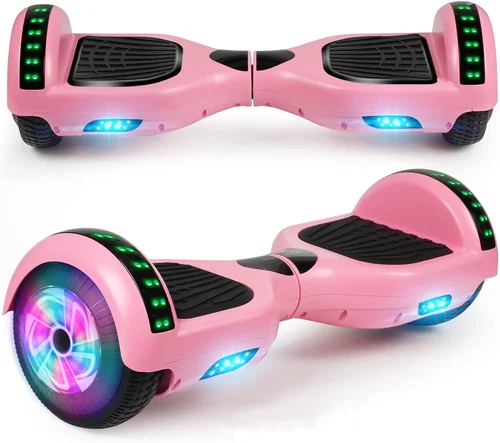
❌ Mistake: Ignoring UL 2272 Certification
Why it’s bad: Buying a hoverboard without UL 2272 certification is like riding without a helmet—it puts you at serious risk of fire, electrical failure, or injury. Uncertified models often use cheap, unstable batteries that can overheat or explode, especially during charging.
What to do instead: Always verify the certification before purchasing. Look for the UL logo, check the manufacturer’s website, or contact customer service. If the seller can’t provide proof, walk away.
❌ Mistake: Choosing Based on Price Alone
Why it’s bad: The cheapest hoverboards often cut corners on safety, build quality, and performance. You might save $50 upfront but end up replacing the board in months due to motor failure or battery degradation.
What to do instead: Set a realistic budget based on your needs. A $150–$250 mid-range model often offers the best balance of safety, features, and durability for most users.
❌ Mistake: Overlooking Weight Capacity
Why it’s bad: Exceeding the weight limit can cause motors to overheat, reduce battery life, and increase the risk of accidents. A 180-lb adult on a 165-lb board is a recipe for trouble.
What to do instead: Check the specs and choose a hoverboard rated for at least 10–20% above your weight. For families, consider models with higher limits (220+ lbs).
❌ Mistake: Not Reading Customer Reviews
Why it’s bad: Product descriptions can be misleading. Real user feedback reveals hidden issues like poor battery life, fragile parts, or unresponsive customer service.
What to do instead: Spend 10–15 minutes reading recent Amazon reviews. Look for detailed experiences, photos, and responses from the seller. Pay attention to recurring complaints.
❌ Mistake: Skipping the Return Policy
Why it’s bad: If the hoverboard arrives damaged or doesn’t perform as expected, a strict return policy can leave you stuck with a defective product.
What to do instead: Only buy from sellers with clear, fair return policies. Amazon’s A-to-Z Guarantee offers extra protection, so prioritize purchases fulfilled by Amazon.
❌ Mistake: Assuming All Features Are Useful
Why it’s bad: Flashy features like Bluetooth speakers or rainbow LEDs don’t improve performance. Some may even drain the battery faster or distract from safety.
What to do instead: Focus on core features that match your use case. For commuting, prioritize range and durability. For kids, safety and ease of use matter most.
❌ Mistake: Buying Without Testing
Why it’s bad: Hoverboards feel different in person. A model that looks great online might be too sensitive, too slow, or uncomfortable to ride.
What to do instead: If possible, test ride at a local store or borrow from a friend. If buying online, choose a model with a generous return window so you can test it risk-free.
Budget Guidelines: How Much Should You Spend?
Entry-Level ($100 – $200): This tier is ideal for kids, beginners, or occasional riders. Expect basic features, solid rubber tires, 250W motors, and a range of 6–8 miles. Models like the Gotrax Hoverfly E9 or Swagtron T1 fall here. While affordable, these may lack advanced safety features or long-term durability.
Mid-Range ($200 – $350): The sweet spot for most buyers. These hoverboards offer UL 2272 certification, 350–500W motors, pneumatic tires, Bluetooth, and 8–12 mile ranges. Brands like Razor Hovertrax and Segway Ninebot S are strong contenders. You get excellent value, reliability, and features without overspending.
Premium ($350 – $500): Designed for adults, commuters, and enthusiasts. Expect high-capacity batteries (12+ mile range), fast charging, all-terrain capability, app integration, and rugged builds. The Gotrax GXL V2 and Segway S-Plus are top picks. These models are built to last and perform under daily use.
Luxury ($500+): For those who want the best. These hoverboards feature cutting-edge tech, premium materials, extended warranties, and sometimes even self-balancing AI. While overkill for casual use, they’re perfect for tech lovers or those who prioritize performance and prestige.
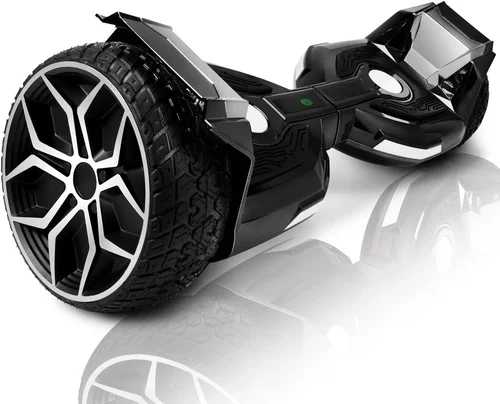
Expert Tips for Getting the Best Deal
1. Shop During Sales Events: Amazon Prime Day, Black Friday, and back-to-school season offer significant discounts. Sign up for deal alerts or use price tracking tools like Honey or CamelCamelCamel to monitor price drops.
2. Buy from Authorized Sellers: Avoid third-party sellers with low ratings or unclear return policies. Stick to Amazon, Gotrax, or brand-certified retailers to ensure authenticity and support.
3. Check for Bundles: Some sellers offer hoverboards with helmets, carrying bags, or extra batteries at a discount. These can save you $30–$50 compared to buying separately.
4. Read the Warranty Details: A longer warranty often indicates better quality. Look for brands that cover batteries and motors, not just the frame.
5. Test Before Committing: If you’re unsure, buy from a seller with a 30-day return policy. Test the hoverboard in a safe, open area to assess balance, speed, and comfort.
6. Avoid “Too Good to Be True” Deals: If a hoverboard is priced 50% below market average, it’s likely counterfeit or defective. Stick to reputable brands and realistic pricing.
7. Consider Refurbished Models: Certified refurbished hoverboards from Amazon Renewed or the manufacturer can offer 20–30% savings with full warranty coverage.
8. Leave a Review: After your purchase, share your experience. Honest reviews help other buyers and encourage brands to maintain quality.

Frequently Asked Questions
Q: Are hoverboards safe for kids?
A: Yes, when used properly and with appropriate safety gear. Choose models with speed limiters, UL 2272 certification, and a weight limit suitable for your child. Always supervise young riders and ensure they wear helmets and pads.
Q: How long do hoverboard batteries last?
A: Most lithium-ion batteries last 300–500 charge cycles, which translates to 1–2 years of regular use. Battery life depends on usage, charging habits, and environmental conditions.
Q: Can hoverboards go uphill?
A: Yes, but performance varies. Models with 350W+ motors can handle inclines up to 15 degrees. Check the manufacturer’s specs for hill-climbing ability before buying.
Q: Are hoverboards waterproof?
A: Most are water-resistant (IP54), meaning they can handle light rain and splashes, but not submersion. Avoid riding through puddles or wet grass unless the model is specifically rated for wet conditions.
Q: How fast do hoverboards go?
A: Speeds range from 6 to 10 mph, depending on the model. Kids’ hoverboards often have lower top speeds (6–7 mph), while adult models can reach 10 mph.
Q: Do I need to charge the hoverboard before first use?
A: Yes. Most new hoverboards arrive with a partial charge. Fully charge the battery before your first ride to calibrate the battery management system.
Q: Can I ride a hoverboard on grass?
A: Only all-terrain models with pneumatic tires are suitable for grass. Solid-tire hoverboards may struggle or get stuck on uneven surfaces.
Q: What should I do if my hoverboard stops working?
A: First, check the battery and charging cable. If the issue persists, contact the manufacturer or seller. Most offer troubleshooting guides or replacement parts under warranty.
Q: Are hoverboards allowed on sidewalks?
A: Laws vary by city and country. In many U.S. cities, hoverboards are allowed on sidewalks but prohibited on roads. Check local regulations before riding.
Q: Can adults ride kids’ hoverboards?
A: Only if the weight and size are appropriate. Most kids’ models have lower weight limits and smaller decks, which can be uncomfortable or unsafe for adults.
Our Final Recommendations
Best for Budget-Conscious Buyers: Gotrax Hoverfly E9 – At under $150, this model offers UL 2272 certification, 6.2 mph top speed, and a 7-mile range. Perfect for kids and casual riders who want safety and reliability without the high price.
Best Overall Value: Segway Ninebot S – Priced around $350, this hoverboard delivers 10+ mile range, app control, LED lights, and a sturdy build. It’s ideal for teens and adults seeking a balance of performance and features.
Best Premium Option: Gotrax GXL V2 – With 12-mile range, 10 mph speed, and all-terrain tires, this $400 model is built for serious riders. It’s durable, fast, and packed with smart features.
Best for Beginners: Razor Hovertrax 2.0 – Known for its smooth ride and beginner-friendly design, this hoverboard includes a training mode and sturdy construction. Great for first-time riders of all ages.
Best for Advanced Users: Segway S-Plus – At $500+, this is a high-performance machine with extended range, fast charging, and advanced app integration. Designed for tech-savvy riders who demand the best.
Conclusion: Making the Right Choice
Choosing the right hoverboard in 2026 isn’t just about picking the shiniest model or the lowest price—it’s about finding a device that matches your lifestyle, safety needs, and long-term goals. From safety certifications and battery life to terrain compatibility and smart features, every detail matters. By using this guide, you’re now equipped to evaluate options critically, avoid common pitfalls, and make a purchase you’ll be happy with for years to come.
Remember, the best hoverboard is the one that fits your budget, supports your weight, and enhances your daily life—whether that’s commuting to class, exploring the neighborhood, or simply having fun with friends. Don’t rush the decision. Take your time, read reviews, compare specs, and prioritize safety above all else. And when you do find the right one, ride responsibly, wear protective gear, and enjoy the freedom that comes with personal electric mobility.
Your perfect hoverboard is out there—now go find it.