
This guide walks you through how to turn light on Gotrax G4 scooter with simple steps and expert tips. Whether you’re a new rider or upgrading your setup, you’ll master lighting control, safety, and troubleshooting in minutes.
Key Takeaways
- Locate the power button: The main control for the Gotrax G4’s front light is integrated into the power button on the handlebar. Pressing it correctly activates the light.
- Use the multi-function button: The G4 features a single button for power and light control. Short and long presses control different functions, including turning the light on and off.
- Check battery level first: The light won’t work if the scooter’s battery is below 10%. Always ensure your scooter is charged before expecting full functionality.
- Enable Eco or Sport mode for better visibility: In brighter modes, the light may appear dimmer due to power-saving features. Switching to Sport mode can improve brightness.
- Maintain and clean the light lens: Dirt, moisture, or fogging can reduce light output. Regular cleaning ensures maximum visibility and safety.
- Troubleshoot common issues: If the light doesn’t turn on, check connections, restart the scooter, or reset the system. Most problems are fixable at home.
- Upgrade for enhanced lighting: While the built-in light is functional, adding external LED lights improves nighttime safety and visibility.
How to Turn Light on Gotrax G4 Scooter: A Complete Step-by-Step Guide
Riding your Gotrax G4 electric scooter at night can be both fun and practical—but only if you can see where you’re going. One of the most common questions new Gotrax G4 owners ask is, “How do I turn the light on?” The good news? It’s simpler than you might think. This comprehensive guide will walk you through everything you need to know about activating, using, and maintaining the built-in front light on your Gotrax G4 scooter. Whether you’re commuting after dark, riding through dimly lit neighborhoods, or just want extra visibility, mastering your scooter’s lighting system is essential for safety and confidence.
In this guide, you’ll learn not only how to turn the light on, but also how to troubleshoot common issues, optimize brightness, and even enhance your lighting setup with aftermarket upgrades. We’ll cover the basics of the Gotrax G4’s control system, explain how the light integrates with the scooter’s power modes, and offer practical tips to keep your rides safe and well-lit. By the end, you’ll be a pro at managing your scooter’s lighting—no confusion, no guesswork.
Understanding the Gotrax G4 Lighting System
Visual guide about How to Turn Light on Gotrax G4 Scooter
Image source: scooterinsights.com
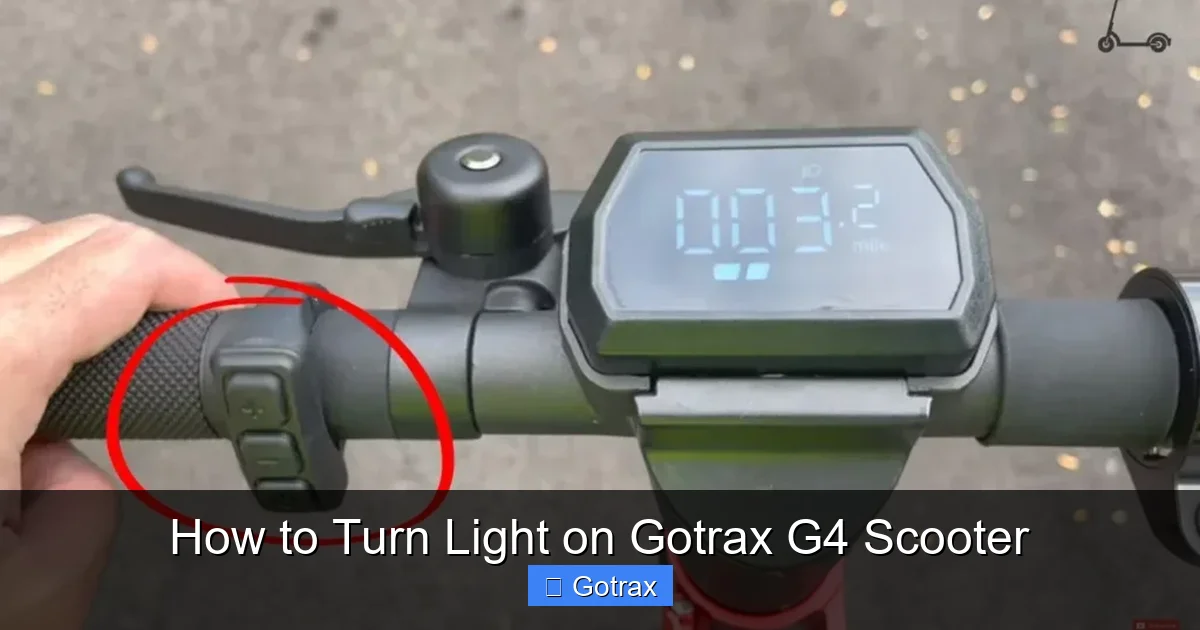
Before diving into the steps, it’s important to understand how the Gotrax G4’s lighting system works. Unlike some electric scooters that have dedicated light switches, the G4 uses a streamlined control interface centered around a single multi-function button located on the left side of the handlebar. This button handles power, mode selection, and—yes—the front LED light.
The front light on the Gotrax G4 is a bright white LED designed to illuminate the path ahead. It’s not just a decorative feature; it’s a critical safety component, especially when riding in low-light conditions. The light automatically activates when you power on the scooter, but it can also be toggled on or off manually using specific button combinations.
One thing to note: the Gotrax G4 does not have a rear brake light or turn signals. The lighting is limited to the front LED. However, the brightness is sufficient for urban riding, and many users enhance it with additional accessories (more on that later).
Step-by-Step: How to Turn Light on Gotrax G4 Scooter
Now, let’s get to the heart of the matter: turning on the light. Follow these simple steps to activate the front LED light on your Gotrax G4.
Step 1: Ensure the Scooter Is Powered On
The first and most important step is making sure your scooter is turned on. The light cannot function if the scooter is off, even if the battery has charge.
To power on the Gotrax G4:
– Press and hold the power button (located on the left handlebar) for 2–3 seconds.
– You’ll hear a beep, and the LED display on the handlebar will light up, showing the battery level and current mode (Eco, Normal, or Sport).
– Once powered on, the front light should automatically turn on.
Tip: If the light doesn’t come on immediately, don’t panic. Some users report a slight delay. Wait 5–10 seconds and check again.
Step 2: Use the Multi-Function Button to Toggle the Light
If the light doesn’t turn on automatically, or if you’ve accidentally turned it off, you can manually toggle it using the same power button.
Here’s how:
– With the scooter powered on, press the power button once (a short press).
– This will cycle through the riding modes: Eco → Normal → Sport → back to Eco.
– After cycling through all three modes, the next short press will turn the light off.
– Press the button again to turn the light back on.
Important: The light toggle happens after the third mode (Sport). So if you’re in Sport mode and press the button once, the light will turn off. Press it again to turn it back on.
Example: You’re in Eco mode. Press once → Normal. Press again → Sport. Press a third time → light turns off. Press a fourth time → light turns back on.
Step 3: Confirm the Light Is On
After following the steps above, visually confirm that the front LED is illuminated. Stand in front of the scooter or look down at the headlight area. The light should emit a bright white beam.
If you’re in a dark environment, the light will be especially noticeable. In daylight, it may appear dimmer, but it’s still active and will help with visibility to others.
Step 4: Adjust Riding Mode for Better Brightness (Optional)
The Gotrax G4’s light brightness can vary slightly depending on the riding mode. This is due to power management settings designed to conserve battery.
– Eco Mode: Maximizes battery life. The light may appear slightly dimmer.
– Normal Mode: Balanced performance. Light brightness is moderate.
– Sport Mode: Delivers maximum power. The light tends to be brightest in this mode.
If you want the brightest possible light, switch to Sport mode before riding at night. To do this:
– With the scooter on, press the power button once to cycle to Sport mode.
– The display will show “S” for Sport.
– The light should now appear brighter.
Note: Sport mode drains the battery faster, so use it wisely, especially on longer rides.
Common Mistakes and How to Avoid Them
Even with clear instructions, users sometimes run into issues when trying to turn on the light. Here are some common mistakes and how to avoid them.
Mistake 1: Not Holding the Power Button Long Enough
Some users press the power button too briefly, thinking it will turn on the scooter. However, the Gotrax G4 requires a 2–3 second hold to power up.
Solution: Press and hold the button firmly for at least 2 seconds until you hear the beep and see the display light up.
Mistake 2: Confusing Light Toggle with Mode Switching
Because the same button controls both riding modes and the light, it’s easy to get confused. Pressing the button once might switch you to Normal mode instead of turning the light on.
Solution: Remember the sequence: Eco → Normal → Sport → Light Off → Light On. Count your presses carefully.
Mistake 3: Assuming the Light Is Broken When It’s Just Off
If the light doesn’t come on, don’t assume it’s broken. It might simply be turned off from a previous ride.
Solution:Mistake 4: Riding with a Low Battery The Gotrax G4’s light may not function properly if the battery is below 10%. The scooter prioritizes core functions over lighting when power is low. Solution: Always charge your scooter fully before riding at night. A full charge ensures all features, including the light, work optimally. If you’ve followed all the steps and the light still won’t turn on, don’t worry. Most issues are fixable with a few simple troubleshooting steps. As mentioned, the light may not work if the battery is too low. Check the LED display: Sometimes, a simple restart can resolve software glitches. Look closely at the front LED: If you see damage, it may need repair or replacement. Contact Gotrax customer support for assistance. The human eye can be fooled in bright environments. The light might be on, but you can’t see it clearly in daylight. Solution: Test the light at dusk or in a dimly lit garage. Cup your hands around the light to block ambient light and see if it’s glowing. If all else fails, perform a full reset: Turning on the light is just the beginning. To get the most out of your Gotrax G4’s lighting and stay safe at night, follow these expert tips. Dirt, bugs, and moisture can accumulate on the lens, reducing brightness. Wipe the front light with a soft, dry cloth after every few rides. For stubborn grime, use a slightly damp cloth—never spray water directly on the scooter. The built-in light helps you see, but it doesn’t make you highly visible to others. Wear reflective clothing or attach reflective tape to your helmet, backpack, or scooter frame. While the Gotrax G4’s light is functional, it’s not the brightest on the market. For enhanced safety, consider adding: Many riders use USB-rechargeable bike lights that attach easily with rubber straps. Look for lights with 200+ lumens for urban riding. Even with lights, avoid poorly lit or isolated paths at night. Stick to streets with streetlights, bike lanes, and moderate traffic. Some cities require electric scooters to have front and rear lights when riding after dark. Make sure your setup complies with local regulations to avoid fines. If you’re serious about nighttime riding, consider upgrading your lighting beyond the factory setup. Replace or supplement the built-in light with a powerful external LED. Popular choices include: These lights offer multiple brightness settings, flashing modes, and long battery life. Some third-party mounts allow you to attach a bike light directly to the Gotrax G4’s stem or handlebar. This keeps your setup clean and secure. Advanced lights like the Garmin Varia or Bontrager Ion Pro RT automatically adjust brightness based on ambient light and include brake-sensing features. Choose lights that match your charging habits. USB-rechargeable lights are convenient and eco-friendly. Pro Tip: Use a light with a “daytime running” mode—a bright flash that increases visibility even in daylight. To keep your Gotrax G4’s light working reliably for years, follow these maintenance practices. – Inspect the light lens for cracks or fogging. – In winter, check for ice or snow buildup that could block the light. – Store the scooter in a dry, cool place. Turning on the light on your Gotrax G4 scooter is a simple process once you understand the button sequence and system logic. By following the steps in this guide—powering on the scooter, cycling through modes, and toggling the light—you can ensure you’re visible and safe during nighttime rides. Remember to keep your battery charged, clean the light regularly, and consider adding extra lighting for maximum safety. Whether you’re commuting, exercising, or just enjoying a evening ride, proper lighting is non-negotiable. With the knowledge from this guide, you’re now equipped to master your Gotrax G4’s lighting system and ride with confidence—day or night.Troubleshooting: What to Do If the Light Won’t Turn On
Check 1: Battery Level
– If it shows one or no bars, charge the scooter fully.
– Wait 30 minutes after charging before testing the light again.Check 2: Power Cycle the Scooter
– Turn off the scooter by holding the power button for 3 seconds.
– Wait 10 seconds.
– Turn it back on and try activating the light again.Check 3: Inspect the Light for Physical Damage
– Is the lens cracked or fogged?
– Is there dirt or moisture inside?
– Is the light housing loose?Check 4: Test in Different Lighting Conditions
Check 5: Reset the Scooter
– Turn off the scooter.
– Press and hold the power button for 10 seconds (even though it’s off).
– Release, then turn it back on normally.
– This can reset the internal electronics and restore functionality.Tips for Maximizing Light Performance and Safety
Tip 1: Clean the Light Regularly
Tip 2: Use Reflective Gear
Tip 3: Add Extra Lighting (Recommended)
– A high-lumen front LED bike light (mounted on the handlebar).
– A rear red LED light (attached to the seat post or backpack).
– Wheel lights or spoke LEDs for 360-degree visibility.Tip 4: Ride in Well-Lit Areas When Possible
Tip 5: Check Local Laws
Upgrading Your Gotrax G4 Lighting System
Option 1: High-Power Front Light
– Cateye Volt 800
– NiteRider Lumina 900
– Magicshine MJ-870Option 2: Integrated Light Mounts
Option 3: Smart Lights with Sensors
Option 4: Battery-Powered or USB-Rechargeable
Maintenance and Long-Term Care
Monthly Checks
– Test the light after every charge.
– Clean the housing and connections.Seasonal Care
– In rainy seasons, ensure the scooter is dried properly to prevent moisture damage.Storage Tips
– Avoid leaving it in direct sunlight, which can degrade the LED over time.Conclusion